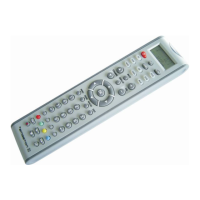
Note:
1. To return to beginning status, please press the EXIT key or the device key (e.g. TV,
or VCR...)
2. The keys , , , , OK, EXIT are only used in the set up mode to set-
up your universal remote control. You can't control your device as normal menu function
during the setup.
DEVICE SETUP BY BRAND AND CODE
1. Turn on the device (e.g. TV, DVD...) you would like to operate. If it is a VCR, Please
insert a tape.
2. Press and hold the SET key on your remote control. Then press (simultaneously) one
of the device keys (e.g. TV, DVD...)
3. Then release them, the Brands will be displayed on the LCD screen.
4. Press the or key to select the brand of your device (e.g. your TV brand:
Tesla), confirm by OK key, then LCD shows “Success!”, exit to the normal mode.
5. Check the function of the keys (e.g. POWER CH+ CH- VOL+ VOL/MUTE), if none of
the keys of your new remote control can work, or most of the keys work improperly,
please try another brand code by the or keys, until all basic functions operate
properly.
6. LCD shows “Success!”, and then it finishes the set-up.
SET-UP BY AUTO SEARCH
If the set-up by brand and code failed or you cannot find the brand name in your remote
control screen, you may use the Auto Search to find the correct code to operate your
device.
1. Turn on the device (e.g. TV, DVD...) you would like to operate. Please insert a
medium, then press device key to select your desired operation device (e.g. DVD)
2. Press and hold the SET key on your remote control for more than 3 seconds, then
release it.
3. Press the or keys to select “Code Setup” on LCD menu, confirm by OK
key, wait for “DEV SEARCH” on the LCD menu, confirm by OK key and then press the
OK key to start the Auto Search. (You must point your remote control to your device at
this moment).
4. See if the device reacts or not, once the device reacts, please press any key to stop
the search. The on/off function will be checked. Confirm by OK key, LCD shows
“Success!”, and exit to the normal mode.
5. Check the function of the keys (e.g. POWER CH+ CH- VOL+ VOL/MUTE). If none of
the keys of your new remote control can work, or most of the keys work improperly,
please repeat Auto Search and choose another code.
SET-UP BY ENTERING CODE


 To Next Page
 Loading...