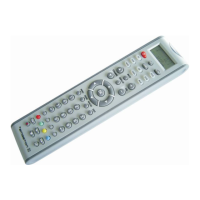
1. Press and hold the SET key on your remote control for more than 3 seconds, then
release it.
2. Press the or keys to select “CONFIGURE” on LCD menu, confirm by OK
key.
3. Press the or keys to select “Clear All” on LCD menu, confirm by OK key.
4. LCD shows “Sure Clear?”, press OK key.
5. LCD shows “Success!”, this finishes the set-up.
Note:
1. To return to beginning status, please press the EXIT key or the device key (e.g. TV,
or VCR...)
2. The keys , , , , OK, EXIT are only used in the set up mode to set-
up your universal remote control. You can't control your device as normal menu function
during the setup.
You may find more detailed info on www.emgeton.com
CAUTION
Do not expose the device to severe impacts or jarring. Vibrations experienced during
walking will not affect the device. However, a fall of device may result in damage.
Be careful when storing the device, do not expose to chemicals and do not use or place
it at the following places:
- places with high humidity
- places with strong magnetic fields
- places with extreme temperatures
- directly under the sunshine or near the equipment that generates heat
DEVICE WARRANTY INFORMATION
The warranty does not apply for compatibility of all devices, especially for devices
manufactured after production date of the universal remote control and also for the
learning function on some original remote controls, and especially for non-original
remote controls.
The warranty does not apply for failures caused by mechanical damages of the device
caused by maltreatment, such as button broken or crushed by too strong pressing,
broken display, mechanical damages caused by fall of device, etc.


 To Next Page
 Loading...