2
1.1 Sub-Menu “Keyboard Functions“
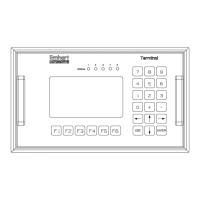
The sub-menu “Keyboard Functions“ is selected via the key. This menu informs
the user about the configuration of the operation control keys.
Key Functions
F1 - Display key functions
F2 - Main menu
F3 - Programming
F4 - weld parameter monitoring
F5 - fault reset
F6 - Release Manual Functions
ESC - ESCAPE, abort
ENT - ENTER, confirmation
0..9 - input SKK/PK, program no.
+ - - change, set/reset values
<↓↑> - select menu, value
Exit the menu by pressing any key.
Display- and Control Panel
Artisan Technology Group - Quality Instrumentation ... Guaranteed | (888) 88-SOURCE | www.artisantg.com


 To Next Page
 Loading...