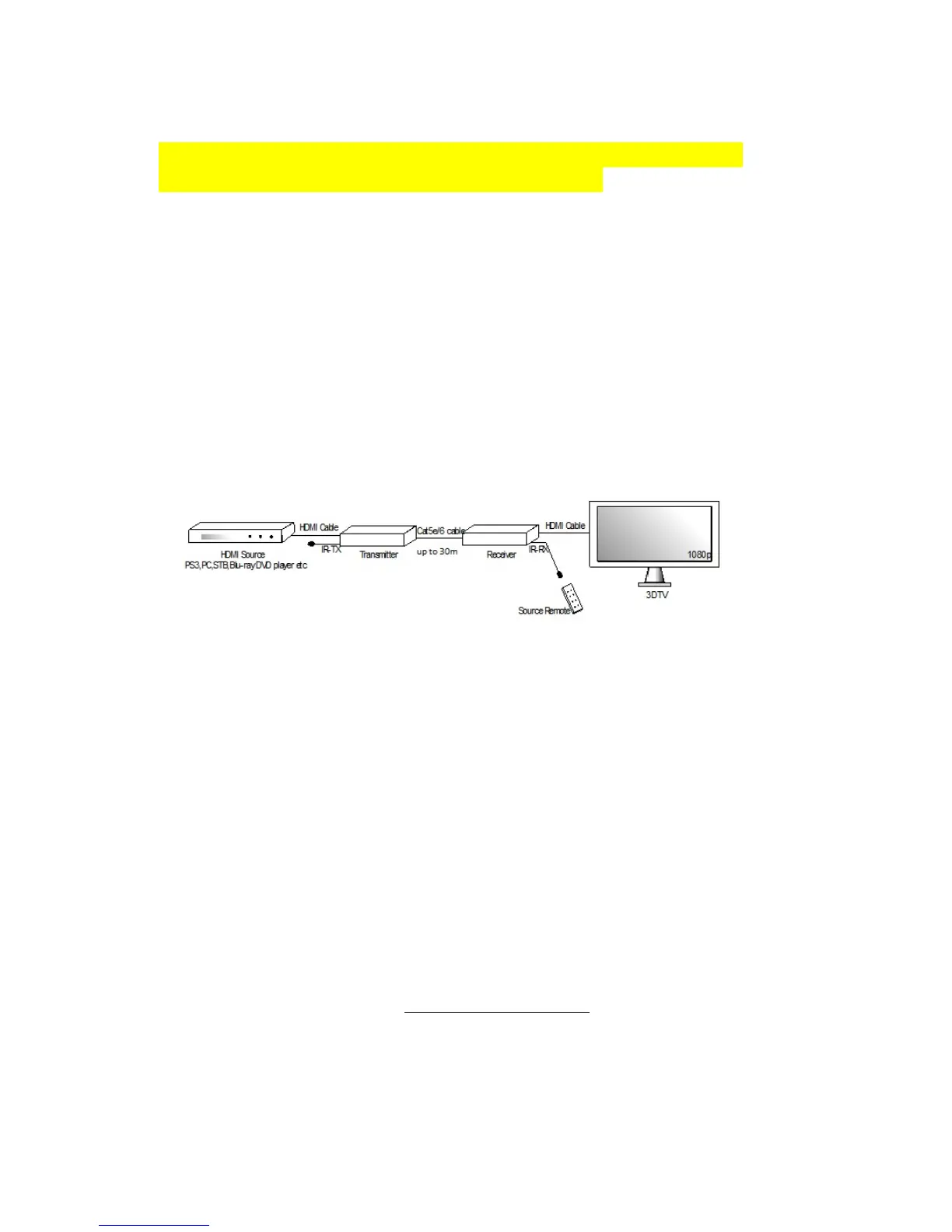
3.0 Installation instructions
Because of the built-in EDID protocol, you need to make sure that all connected
devices are powered before the HDMI extender is turned on.
1. Connect the HDMI signal source ( such as Media player, BD/DVD player etc.) to
the HDMI Transmitter.
2. Connect two Cat5e/Cat6 cables with a max. 30m. length to both the outputs of the
transmitter and the inputs of the Receiver.
3. Connect the HDMI display device (such as HDTV) to the HDMI output port.
4. Connect the IR-RX cable to the IR-RX port, connect the IR-TX cable to the IR-TX
port.
5. Insert the DC side of 5V power supply into the HDMI receiver and connect the AC
side of the power supply into the wall outlet.
3.1 EDID
EDID can read the “Extended Display Identification Data” information from the
connected display devices. EDID is a data structure provided by digital displays to
describe its capabilities to a video source. It enables a personal computer to know
what kind of monitor is connected to it and thus the capabilities of the identified
monitor.
4.0 Frequently Asked Questions and other
related information
The latest Frequently asked questions for your product can be found on the support
page of your product. Eminent will update these pages frequently to assure you have
the most recent information. Visit www.eminent-online.com
for more information about
your product.



 To Next Page