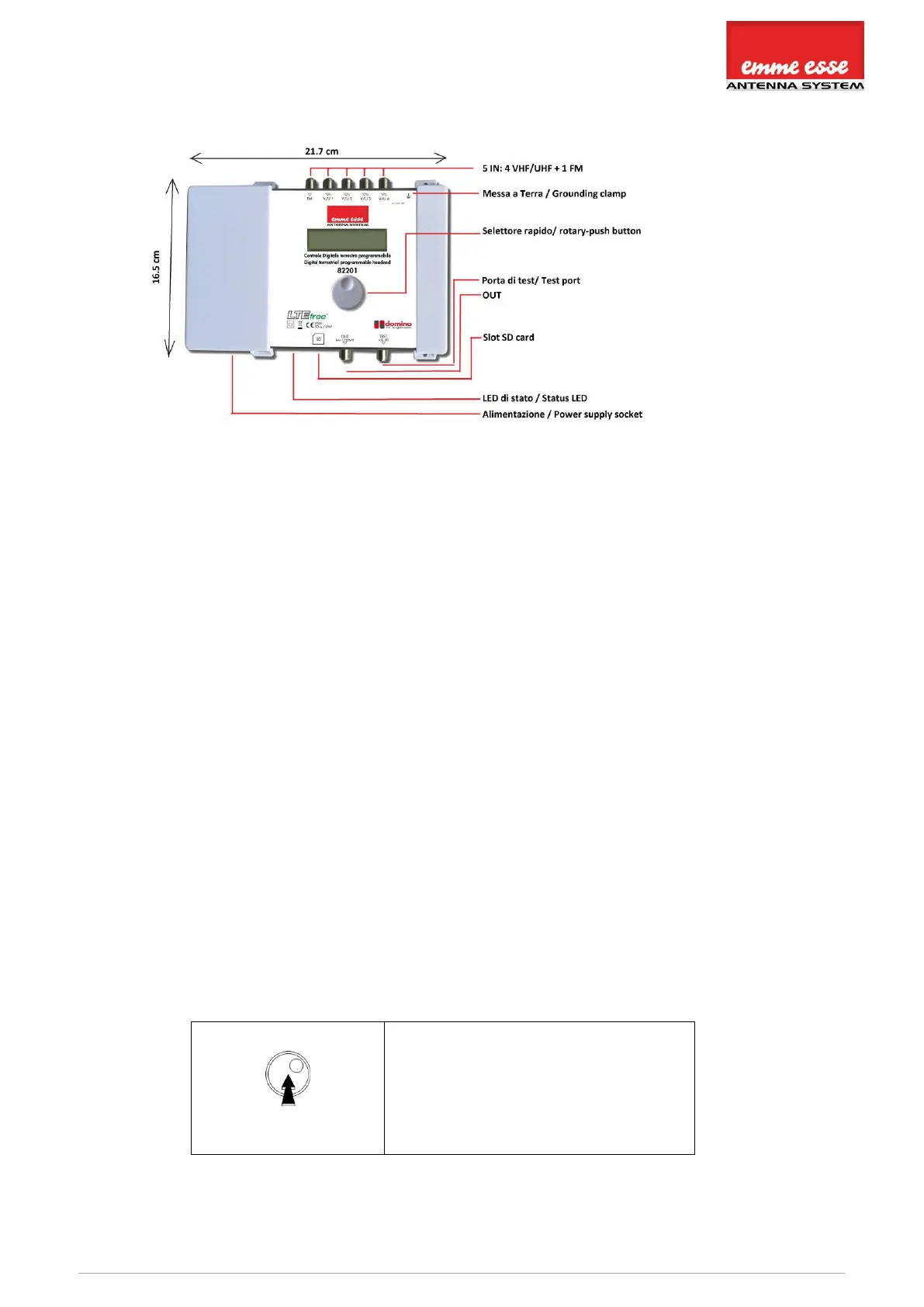
Centrale digitale terretre programmabile / Digital terrestrial programmable headend
4. HARDWARE INSTALLATION
5. MOUNTING 82201
Important: Mount the module vertically to a wall in a well-ventilated room and leave a
minimum space of 15 cm around the product to guarantee a maximum ventilation of
the product
Connect an earth wire to the grounding clamp
Connect the power adapter cord to the power supply socket. Check the status LED for
the indication of DC power presence
Connect the VHF/UHF and/or FM inputs to the Domino TV organizer
Connect a coaxial cable to the output connector for distribution of the signal
Connect a network analyser to the test port to control the signal quality
Configure the Domino TV organizer using the rotary button, see below
Optionally: insert an SD card in the SD card slot to upload the configurations of a
previous module or to copy the configuration to another module
The power adapter can easily be replaced without disconnecting the product. To do so,
open the top left plastic cover by pushing the click at the opposite side of the mains
connector
6. CONFIGURING 82201
In this section, the configuration for the Domino TV organizer will be described.
Use the rotary/push button to navigate through the menu. This is very straightforward and
simple. The table below shows how the rotary/push should be used:
Push the button 2s to enter the basic
configuration.
Push the button to confirm your
selections.



 To Next Page