12 / 18
Remote Control
The EMMO T350 comes with a remote control that allows you to arm and disarm the alarm
system as well as change songs that you are listening to.
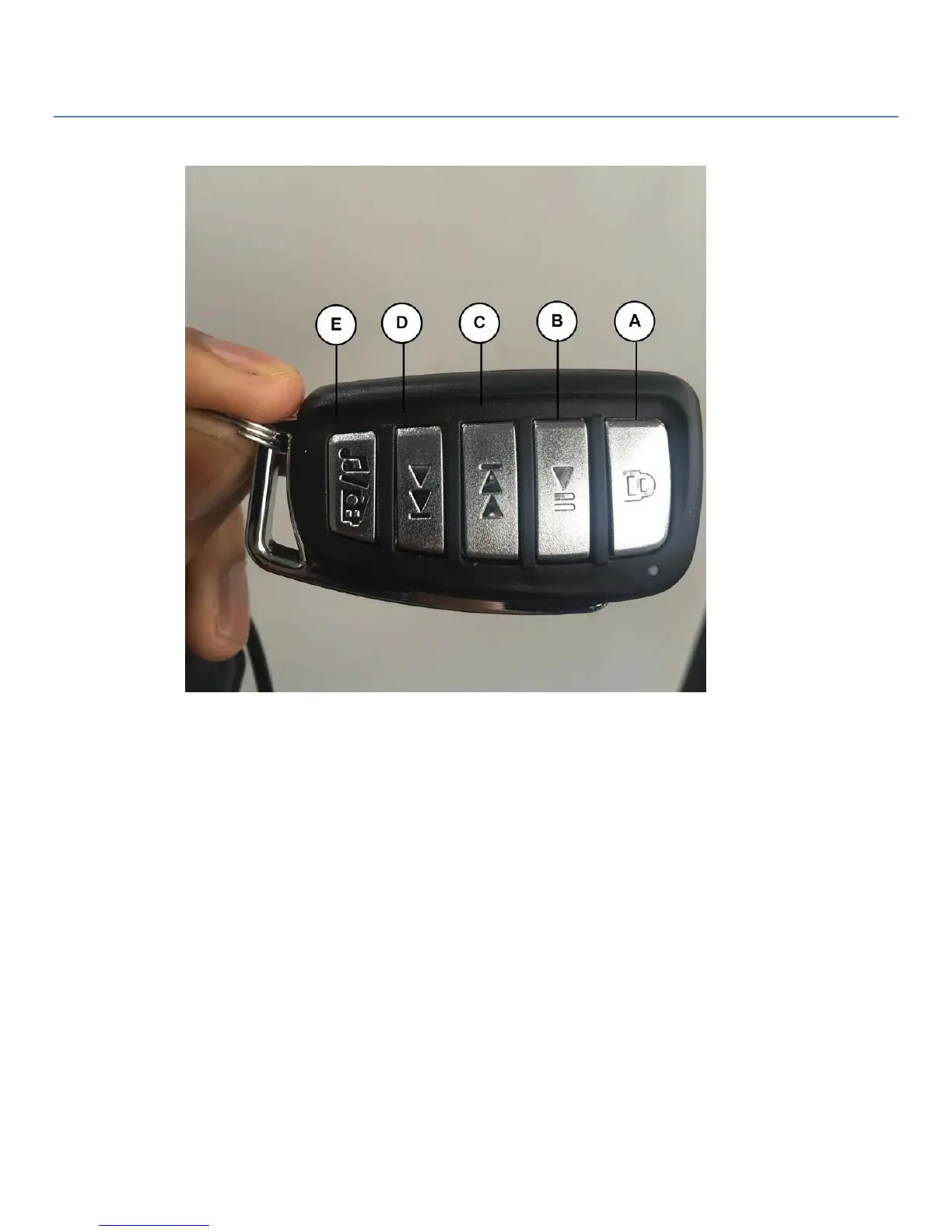
A) Alarm / Volume Reset - Once the unit is turned off the press this button to turn on the alarm.
Press it again to turn it off. While on press this to turn off the radio and reset the volume to low.
*Please note that once you turn the alarm on there is a 5-second delay before it is activated*
B) Play / Pause music - Press this is to turn on the radio / Mp3 player press it a second time to
pause/stop the radio / Mp3 player.
C) Seek Reverse / Last Song / Volume Increase- Press this button to find a station with a lower
frequency or play the last song played on the Mp3 player. Press and hold this button to increase the
volume.
D) Seek Forward / Next Song - Press this button to find a station with a higher frequency or
play the next song on the Mp3 player
E) Source - Press this button once to switch from the Mp3 player or ra


 To Next Page