14 / 18
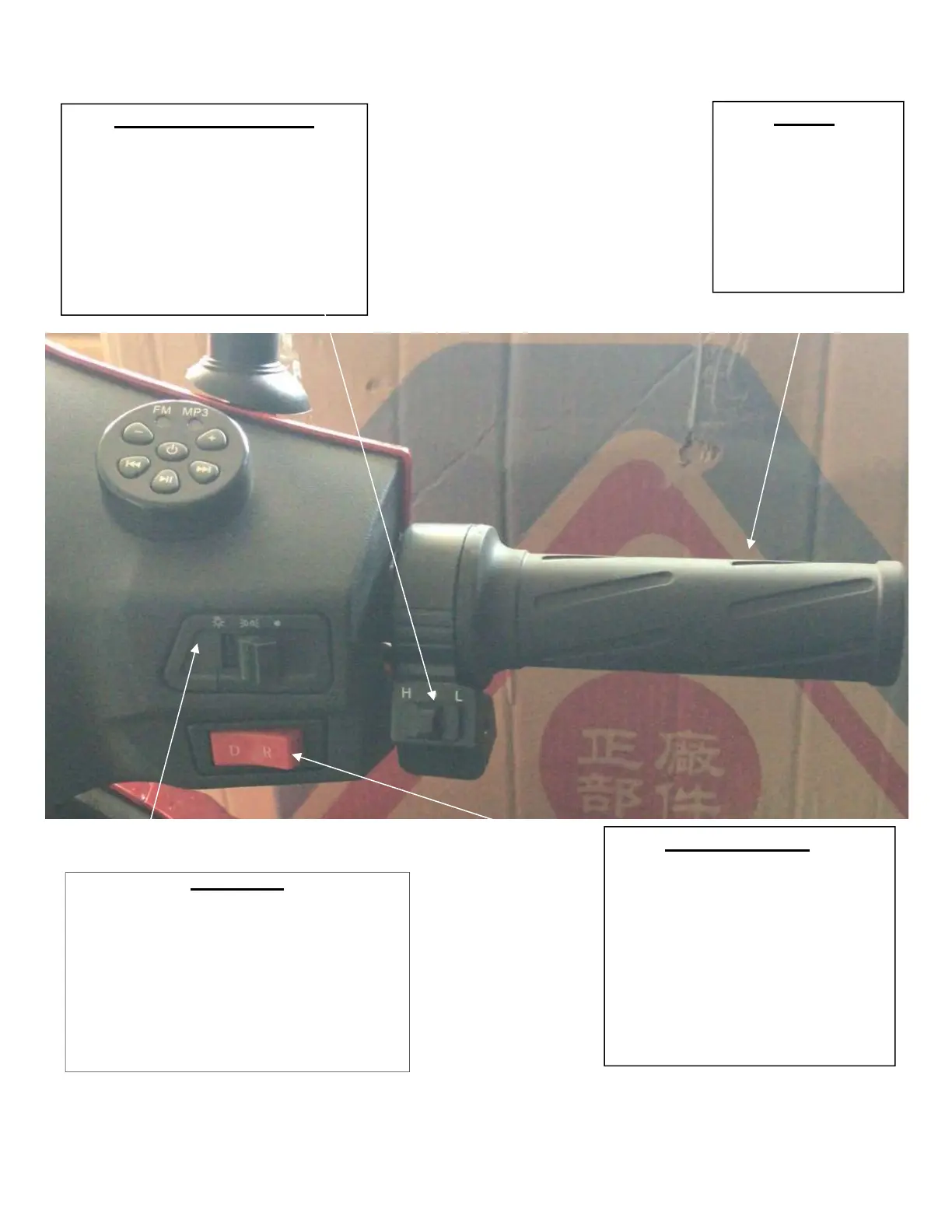
Light Switch
This switch controls the amount of lightning on
your bike. When the switch is pushed to the
right, no extra lights are turned on. (Only brake
lights work) When the switch is in the middle,
the display light and tail light turns on. When
the switch is pushed to the left, the head-lights,
display lights, and tail-lights are turned on.
Speed Switch (Adjustment)
Once you have selected one of the two
speeds, you can make further
adjustments by fine tuning your speed
and throttle response using this knob.
Turning it to the left will make the bike
slower and turning it to the right makes
it go faster.
Throttle
Make sure that you are
properly situated on the unit.
Once the vehicle is on (you
will see that the dashboard is
lit up). Use the throttle on
the right hand to rotate
towards you.
Throttle: Rotate that towards
you to drive.
Forward/Backward
When this button is pushed to the left,
the bike moves forwards when the
throttle is activated. When this button
is pushed to the right the bike moves
backwards when the throttle is
activated.


 To Next Page