8
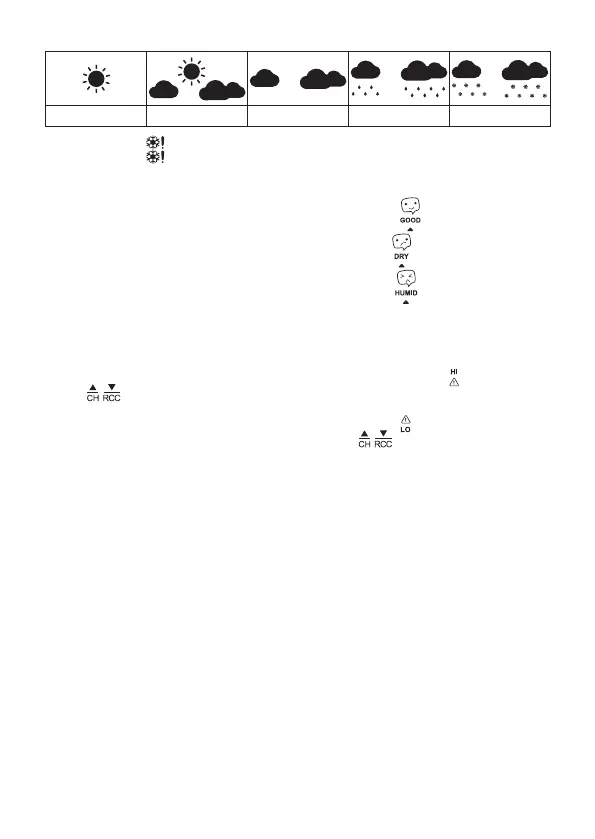
Weather Forecast Icons
sunny cloudy overcast rain snow
The snowake icon
will be ashing at outdoor temperature between 0 °C and +2.9 °C.
The snowake icon will remain on the screen at outdoor temperature below 0 °C.
Comfort Level Indicator – Smiley
The comfort level indicator is displayed in eld no. 9.
If indoor humidity is between 40–70 % RH, the screen will display the
icon.
If indoor humidity is lower than 40 % RH, the screen will display the
icon.
If indoor humidity is higher than 70 % RH, the screen will display the
icon.
Setting Temperature Limits for Maximum and Minimum Temperature
Temperature limits can be set independently for up to 3 outdoor temperature sensors.
Press the CH button repeatedly to select the number of the sensor you want to set the temperature
limit for.
Long-press the ALERT button. The value for setting a maximum temperature alert
will start ashing.
Use the
/ buttons to set the value of choice (1 °C resolution).
Holding the buttons speeds up the value adjustment.
Then press the ALERT button and set the minimum alert temperature .
After the value is set, press the ALERT button and press the
/ buttons repeatedly to activate
(ON) or deactivate (OFF) the function.
When the set temperature limit is exceeded, an audio alarm will sound 4× per minute and the value
will start ashing.
Pressing any button silences the audio signal but the value will continue ashing.
The value will stop ashing once it drops below the set temperature or you deactivate the temper-
ature alert function.
Upkeep and Maintenance
The product is designed to serve reliably for many years if used properly. Here are some tips for
proper operation:
• Read the manual carefully before using the product.
• Do not expose the product to direct sunlight, extreme cold and humidity and sudden changes in
temperature. This would reduce measuring accuracy. Do not place the product in locations prone
to vibration and shocks – may cause damage.
• Do not subject the product to excessive force, impacts, dust, high temperatures or humidity –
doing so may cause malfunction, shorten battery life, damage batteries and deform plastic parts.
• Do not expose the product to rain or moisture if it is not designed for outdoor use.
• Do not place any open ame sources on the product, e.g. a lit candle, etc.
• Do not put the product in places with inadequate air ow.
• Do not insert any objects into the product‘s vents.
• Do not tamper with the internal electrical circuits of the product – doing so may damage the
product and will automatically void the warranty. The product should only be repaired by a
qualied professional.
• To clean the product, use a slightly moistened soft cloth. Do not use solvents or cleaning agents
– they could scratch the plastic parts and cause corrosion of the electric circuits.



 To Next Page