5
Measuring Direct Current
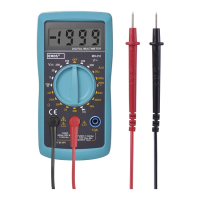
1. Connect the plug of the red measuring conductor
into the
socket and the black conductor
into the COM socket. If the measured voltage is
between 200 mA and 10 A, connect the plug of
the red measuring conductor into the 10 A socket.
2. Turn the circular switch to function marked .
3. Connect the multimeter serially to the circuit you
wish to measure and turn on the power supply to
the measured device.
4. The screen will display the measured current and
polarity relative to the red measuring tip.
Never use the device to measure current in places
where the idle voltage in an open circuit exceeds 300 V.
Measuring current at higher idle voltage could result in
damage to the device (fuse burnout, electric discharge)
or injury by electric current!
Measuring Resistance
1. Connect the plug of the red measuring conductor
into the
“ socket and the black conductor into
the COM socket.
2. Turn the circular switch to function marked
.
Select measuring range. Turn o the power sup-
ply to the circuit and discharge all high-voltage
capacitors before measuring resistance in the
circuit. Doing so prevents potential damaging of
the multimeter.
3. Connect the measuring tips to the device or circuit
where you wish to measure resistance.
4. The screen will show the measured resistance
value.
Note:
1. When measuring resistances higher than 1 MΩ, it is
necessary to wait a few seconds before the measured
value stabilizes.
2. If the circuit is open, the ”OL” symbol will appear,
same as when the measuring range is exceeded.
Before measuring resistance, make sure that the
measured object is disconnected from power supply
and all its capacitors are fully discharged.
Diode Test
1. Connect the plug of the red measuring conductor
into the
socket and the black conductor into
the COM socket.
2. Turn the circular switch to function marked .
3. Place the red measuring tip onto the diode‘s
anode and then the black measuring tip onto the
diode‘s cathode.
4. The screen will show voltage in mV for the direc-
tion of current ow. „OL“ will appear on the screen
if the polarity has been reversed.
Circuit Continuity Test
1. Connect the plug of the red measuring conductor
into the
socket and the black conductor into
the COM socket.
2. Turn the circular switch to function marked .
3. Connect the measuring tips to the tested circuit
or device. If resistance is lower than 20 Ω, you will
hear a buzzer.
Note: Before making measurements, make sure that the
measured circuit is disconnected from power supply and
all its capacitors are fully discharged.
Changing Batteries
If the display shows the symbol, the battery needs
replacing. Use a suitable screwdriver to change the
battery.
Before changing the battery, disconnect the measuring
tips from the measured circuit or device and turn the
switch to the OFF position.
Unscrew the rear cover.
Replace the 9 V type 6F22 battery with a new one.
Use alkaline batteries only. Do not use rechargeable
batteries.
Make sure to observe the correct polarity. After chang-
ing the battery, replace the cover and screw it back on.
Replacing the Fuse
If the fuse burns out, it is most likely caused by
improper handling. The multimeter uses fuses with
these parameters:
F 250 mA/300 V, ø 5×20 mm, F 10 A/300 V, ø 5×20 mm.
The fuse is located under the battery cover. Always
replace the fuse with a fuse of the same type and
parameters. Replace the battery cover and close it shut.
To replace the F 10 A L 300 V fuse, contact a service
centre.
Before changing a fuse, disconnect the measuring tips
from the measured circuit or device and turn the switch
to the OFF position.
This device is not intended for use by persons (including
children) whose physical, sensory or mental disability
or lack of experience and knowledge prevents safe use,
unless they are supervised or instructed regarding use
of the appliance by a person responsible for their safety.
Children must always be supervised and must never
play with the device.
Do not dispose with domestic waste. Use special
collection points for sorted waste. Contact local
authorities for information about collection
points. If the electronic devices would be disposed on
landll, dangerous substances may reach groundwater
and subsequently food chain, where it could aect
human health.
Emos spol. s r. o. declares that the MD-210 is in com-
pliance with the essential requirements and other
relevant provisions of Directive. The device can be freely
operated in the EU. The Declaration of Conformity can
be found at http://www.emos.eu/download.
You can request technical assistance from the
supplier:
EMOS spol. s r. o., Šířava 295/17, 750 02 Přerov I-¬Město


 To Next Page