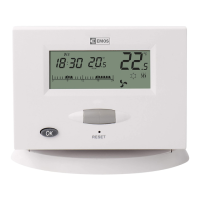
6
(1) Set Temperature
(2) Room Temperature
(3) Temperature Unit Icon
(4) Week Days
(5) Hours
(6) Minutes
(7) Heating Icon
(8) Cooling Icon
(9) Low Batteries Icon
(10) Day Icon (comfort)
(11) Night Icon (cost-saving)
(12) 24-Hour Day Program
(13) Program MORN (morning) period
(14) Program DAY (day) period
(15) Program EVEN (evening) period
(16) Program NIGHT (night) period
(17) Time Setting Icon (TIME)
(18) Program Setting Icon (PROG)
(19) Setting Icon (SET)
(20) Vacations Icon (VACA)
(21) Temporary Mode Icon (HOLD)
(22) Manual Mode Icon
(23) Earlier Start Icon (EARLY)
(24) Anti-Freeze Function
(25) Conrmation Icon (OK)
(26) Spinning Fan Icon – Output Relay Switch
LED Indicators
Automatic Mode
During the automatic mode the red OUTPUT LED will light up when the output relay will be switched
onbythethermostat.
Manual Mode
Press the MANU button, the red LED will light up.
To switch on the output relay press the OUTPUT button, the red diode will light up.
By pressing the OUTPUT button you will turn ON/OFF the device.
By pressing the MANU button you deactivate the manual mode, the LED will not be on.
Notice: If the power outage occurs at the receiver, the status before the outage will not be reestablished.
The receiver will be in the switched o status and will await another status change, coming from the transmitter.
THERMOSTAT SETTING
Press long – for 2 seconds – the OK button to access the menu of the thermostat. You can move in the menu by turning
the thumb-wheel. To exit menu press the OK button for two seconds or select by the thumb-wheel the OK option and
then press OK. Otherwise wait 15 seconds without pressing any button.
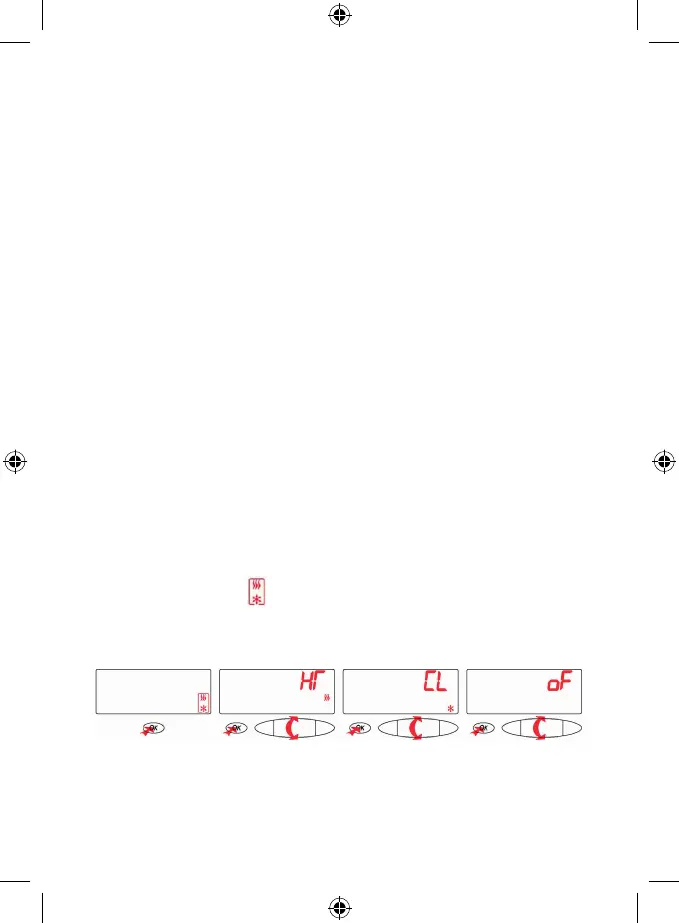
Selecting the Heating or Air Conditioning System/Switching o the Thermostat
By the thumb-wheel select the icon
(heating/cooling) and press the OK button.
By the thumb-wheel select either HT for heating, CL for cooling, OF to switch o the thermostat.
Press OK to conrm and return to the main menu.
Hour and the Week Day Setting
By the thumb-wheel select the TIME icon and press OK button.
1. By the thumb-wheel select the current week day (Mo – Monday, Tu – Tuesday, We – Wednesday, Th – Thursday,
Fr – Friday, Sa – Saturday, Su – Sunday) and conrm by pressing the thumb-wheel.
2. By the thumb-wheel select hour and conrm by pressing the thumb-wheel.
3. By the thumb-wheel select minute and conrm by pressing the thumb-wheel.
Press OK to conrm.


 To Next Page
 Loading...