9
Day Program – 4 Periods
To set the program within the day 4-period program, by the thumb-wheel select
the PROG icon and then press OK.
By the thumb-wheel set a day or a time interval, conrm by pressing OK.
It is possible to select:
Monday – Sunday ( Mo Tu We Th Fr Sa Su)
Monday – Friday (Mo Tu We Th Fr)
Saturday – Sunday ( Sa Su)
or particular days, see the names of days in the program Monday – Sunday.
The icon MORN (morning) will start ashing and this you can set.
By turning the thumb-wheel select a dierent period, to set morning (MORN), day (DAY),
evening (EVEN), night (NIGHT).
Press the thumb-wheel, access the mode where you can set the time from when the selected period should start.
After you set the hour, press the thumb-wheel and set the minutes and conrm by pressing the thumb-wheel again.
After this the temperature setting will start ashing.
Set the temperature for possible cooling rst (the snow ake icon), conrm by pressing the thumb-wheel.
Then set the heating temperature (the three ames icon) all for a particular period.
By turning the thumb-wheel you access the setting mode of the next period (will start ashing).
Use the same steps to set the next three periods. Conrm by OK.
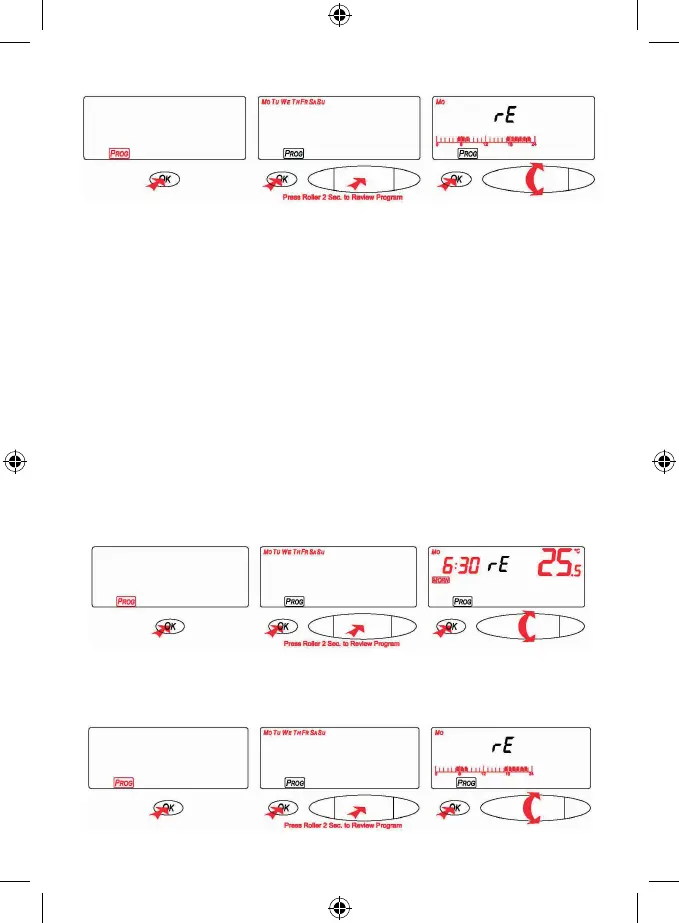
To check the setting within the day program – 4 periods, by the thumb-wheel select the PROG icon and then press
OK. Press and hold the thumb-wheel for 2 seconds. The rE will be shown on the display.
Now, by the thumb-wheel, you can change the days and you can check your setting for each day.
By pressing OK you will return to the main menu.


 To Next Page