8
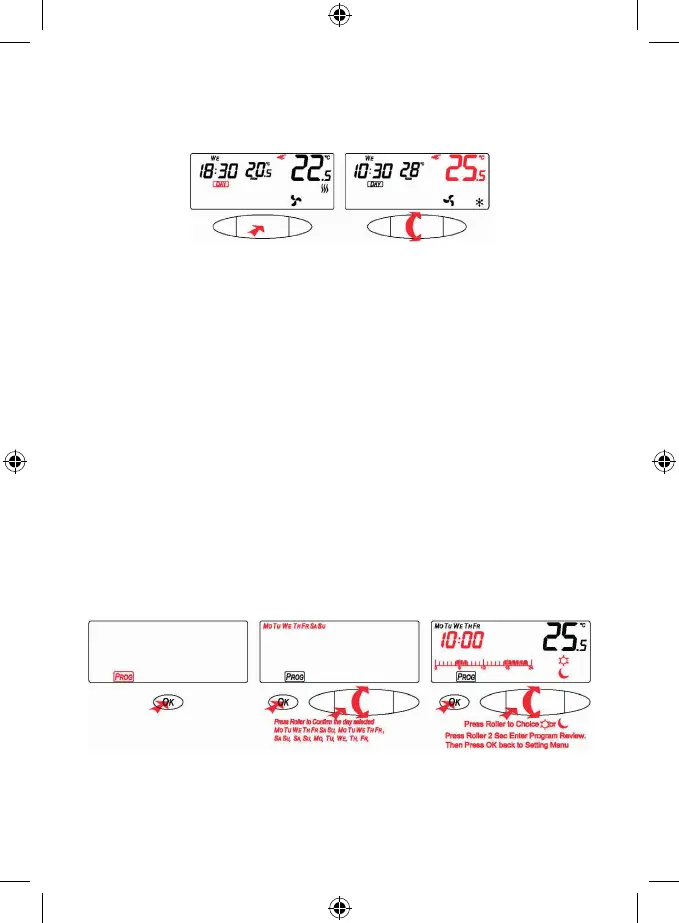
When having a day program divided into 4 periods, press the thumb-wheel and the other periods will start
ashing, now by further pressing the thumb-wheel you switch over between the periods (morning, day, evening,
night).
The chosen period (not ashing) conrm by pressing OK, otherwise wait a few seconds. You can change the
temperature by turning the thumb-wheel.
Program Setting
The program you chose will be applied (24 hrs. / 4-day periods)
24-Hour Day Program
To select a program withing the 24-hour cycle, by the thumb-wheel select the
PROG icon and then press OK.
By the thumb-wheel set a day or a time interval, conrm by pressing OK.
It is possible to select:
Monday – Sunday (Mo Tu We Th Fr Sa Su)
Monday – Friday (Mo Tu We Th Fr)
Saturday – Sunday (Sa Su)
or particular days, see the names of days in the program Monday – Sunday.
Now, set on the time line, when the thermostat should switch over into what desired temperature (day/night).
By pressing the thumb-wheel you can switch over between the day (comfort) and night (cost-saving) temperatures.
The ashing cursor starts at the zero hour on the time line, you can see this illustrated above the time line. From this
0 hour select a temperature (day/night) by pressing the thumb-wheel. Now, by the thumb-wheel set the switching
time, hour by hour, for the particularly set temperature. The hours are read and the cursor moves on the time line.
To process the next temperature change (day/night) press the thumb-wheel again.
Set the desired temperatures for all 24 hours.
The day temperature displays as black pieces on the time line,
the night temperature is without any pictured pieces.
To exit setup and store the changes, conrm by pressing OK.
To check the setting within the 24-hour day program, by the thumb-wheel select the PROG icon and then press OK.
Press and hold the thumb-wheel for 2 seconds. The rE will be shown on the display.
Now, by the thumb-wheel, you can change the days and you can check your setting for each day.
By pressing OK you will return to the main menu.


 To Next Page