17
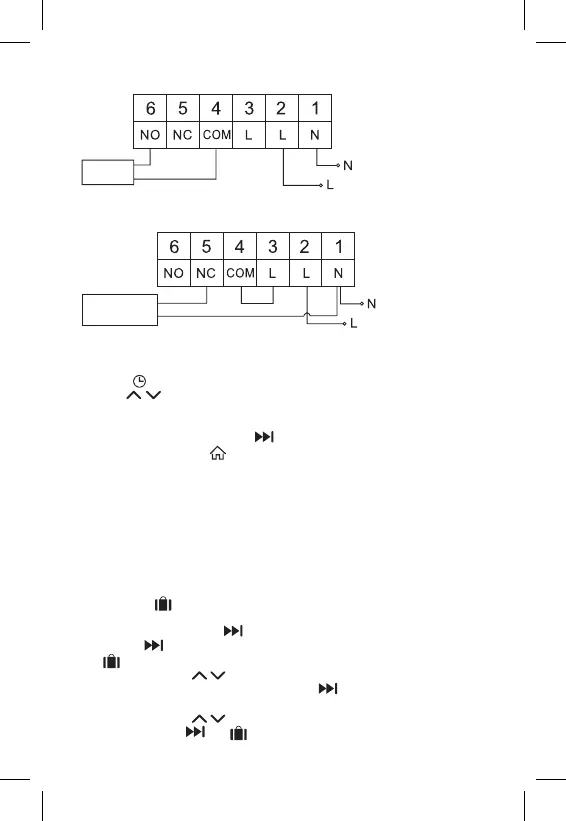
Boiler Connection Diagram
Boiler
• The pre-installed wire coupler will not be connected.
Expansion Valve/Electric Drive Connection Diagram
Connected
device
PUTTING THE DEVICE INTO OPERATION
Setting the Clock, Calendar
Press the button; the values will start ashing.
Use the buttons to set the following values (holding the button down
accelerates the value change):
Day – Month – Year – Hour – Minute.
Conrm the set value by pressing .
To end setting, press the button or wait 30 seconds.
After setting is complete, the current day number will be displayed:
1 – Monday
2 – Tuesday
3 – Wednesday
4 – Thursday
5 – Friday
6 – Saturday
7 – Sunday
WORK MODES
Holiday Mode
Sets a constant temperature for an extended period of time.
Long-press (5 seconds) the button; the time value will start ashing.
Release the button and press it again for 5 seconds.
The icon will appear and the number of days will start ashing.
Repeatedly press the button to set the number of days (from 1 to 99).
Conrm the set number of days by pressing ; the temperature value will
begin ashing.
Repeatedly press the button to set the temperature.
Conrm by pressing ; the icon will appear.


 To Next Page