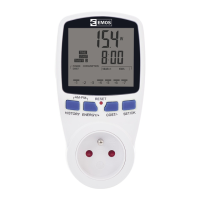
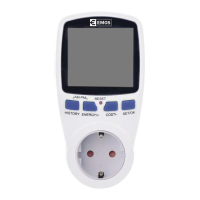
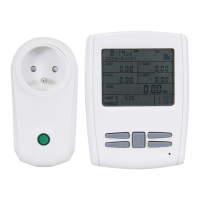
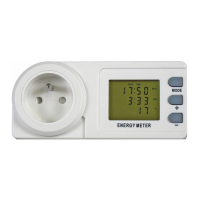
The P5805 Digital Power Meter is an electronic device designed to measure power consumption and display operating costs through a graphical interface. This graph can be configured to show data for the last 7 days, weeks, or months, enabling users to monitor and reduce power costs and CO2 emissions.
Technical Specifications:
- Nominal Voltage: 230–240 V~/50 Hz
- Nominal Current: Max. 16 A
- Max. Load: 3 680 W
- Operating Voltage: 175–276 V~/50 Hz
- Recorded Period: 0 seconds to 9 999 days
- Operating Temperature: 0–50 °C
- Measuring Range: 2 to 3 680 W
- Power Consumption Range: 0 kWh to 9 999 kWh
- Battery: 2× 1.5 V (LR44/AG13)
- Operating Conditions: Normal dry conditions with relative humidity ranging from 20 to 90 %
Usage Features:
Connection:
To set up the device, first remove the plastic ring from the battery compartment at the rear. The installed 2× 1.5V (LR44/AG13) batteries power the meter's memory. Next, connect the meter to a 230 V~ power network, but do not connect any appliance yet. If the display is blank or unreadable, press the "RESET" button with a sharp object (like a pen or pencil). The screen will then display all characters for approximately 3 seconds.
Display Settings:
-
Current Time Setup:
- Press and hold the "SET/OK" button for 3 seconds to enter settings mode; the clock icon will blink.
- Use "ENERGY/+" to increase values or "COST/-" to decrease them.
- Press "HISTORY" to switch between hours and minutes.
- Once the time is set, press "SET/OK".
- To switch between 12/24 hour mode, simultaneously hold "HISTORY" and "ENERGY/+" for 3 seconds. The display will show "AM" or "PM" to indicate the selected mode.
-
Total Operating Time (TOTAL TIME):
- The meter automatically starts recording total operating time when the connected appliance's input power exceeds 2 W.
- Press the "COST/-" button to display the total operating time.
-
Display Sequence (using "COST/-" button):
- Total operating time.
- Total power consumption (0.00–9 999 kWh).
- Total power costs (0.00–9 999 EUR/Kč/€).
- Power costs in tariff 1 (0.00 EUR/Kč/€ per kWh – 9 999 EUR/Kč/€ per kWh).
- Tariff 1 start time.
- Power costs in tariff 2 (0.00 EUR/Kč/€ per kWh – 9 999 EUR/Kč/€ per kWh).
- Tariff 2 start time.
- CO2 volume in kg (0.00 – 9 999 kg CO2/kWh).
- Total CO2 consumption in kg (0.00 – 9 999 kg).
-
Setting Power Current Tariff:
- Keep pressing "COST/-" until you reach the power current tariff settings.
- Hold "SET/OK" for 3 seconds; "DUAL TARIFF" will blink.
- Press "SET/OK" again. Use "HISTORY" to change digits, and "ENERGY/+" or "COST/-" to set the range (0.00 EUR/Kč/€ per kWh to 9 999 EUR/Kč/€ per kWh).
- Move between numbers with "HISTORY".
- Press "SET/OK" to confirm.
- Setting Tariff 1 Time: After setting tariff values, "TIME START" will appear. Press "HISTORY" to select the value to change, then "ENERGY/+" or "COST/-" to adjust. Press "SET/OK" to confirm.
- Setting Tariff 2: Follow the same steps as for Tariff 1.
- Note: If dual tariff is set, tariff 1 activates at its set time and deactivates when tariff 2's set time begins. Tariff 2 ends when tariff 1 begins.
-
Overload Settings:
- Hold "ENERGY/+" for 3 seconds until "OVERLOAD" appears in the top left corner.
- Use "HISTORY" to navigate between values and set the maximum load (default: 3 680 W).
- Save settings by pressing "SET/OK". "OVERLOAD" will blink if the set value is exceeded.
-
Setting CO2:
- Keep pressing "COST/-" until the CO2 screen appears.
- Hold "SET/OK" for 3 seconds. Use "HISTORY" to navigate and "ENERGY/+" or "COST/-" to adjust values.
- Save settings by pressing "SET/OK".
-
Consumption Graph (Last 7 Days/Weeks/Months):
- Use "HISTORY" to switch between displaying data for the last 7 days, 7 weeks, or 7 months.
- 7 Days: Each bar represents 1 kWh.
- 7 Weeks: Each bar represents 20 kWh (2 kWh × 10).
- 7 Months: Each bar represents 50 kWh (5 kWh × 10).
- Individual bar values: 1 kWh, 2 kWh, 3 kWh, 5 kWh, 10 kWh (1 kWh × 10), 15 kWh, 20 kWh (2 kWh × 10), 30 kWh (3 kWh × 10), 50 kWh (5 kWh × 10).
-
Actual Consumption (Days/Weeks/Months):
- Last 7 Days: Hold "HISTORY" for 3 seconds when "daily" is shown. Use "ENERGY/+" or "COST/-" to select a day (-1 for yesterday, -2 for two days ago, etc.). Actual consumption is shown on the second line.
- Last 7 Weeks: Hold "HISTORY" for 3 seconds when "weekly" is shown. Use "ENERGY/+" or "COST/-" to select a week (-1 for last week, -2 for two weeks ago, etc.). Actual consumption is shown on the second line.
- Last 7 Months: Hold "HISTORY" for 3 seconds when "monthly" is shown. Use "ENERGY/+" or "COST/-" to select a month (-1 for last month, -2 for two months ago, etc.). Actual consumption is shown on the second line.
Maintenance Features:
-
Quickly Deleting Data:
- Press and hold "ENERGY/+" and "COST/-" simultaneously for 3 seconds until the screen blinks.
- Then, press and hold "SET/OK" for 3 seconds to erase all data.
-
Replacing Batteries:
- Open the battery compartment cover on the back.
- Remove the old batteries.
- Insert new 2× 1.5 V (LR44/AG13) alkaline batteries, ensuring correct polarity. Do not use rechargeable batteries.
- Close the cover.
Safety Warnings:
- Connect the meter to a 230 V~/50 Hz (±10 %), max. 16 A network with a safety switch/contact.
- Only appliances powered by 230 V~/50 Hz can be connected.
- Observe appliance type label data.
- Maximum input power of connected appliances must not exceed 3 680 W (max. current 16 A).
- Use the meter only in closed, dry environments. Outdoor use is strictly forbidden.
- The screen is powered by alkaline batteries. Do not recharge, short circuit, disassemble, or throw batteries into fire. Do not mix new and old batteries, different types, systems, or brands. Remove batteries if the device is not used for a long period. Store batteries out of reach of children.
- Any use not listed in the manual may damage the product and create risks (short circuit, electric shock). The meter must not be altered or restructured. Follow safety warnings unconditionally.
- The manufacturer is not responsible for material damage or injury caused by improper use or disregard of instructions. Warranty claims are void in such cases.
- Ensure the protective conductor is not disrupted, as this endangers the user.
- Recommended operating temperature: 0 °C to +50 °C. Higher temperatures, especially with large appliances, can cause overheating and permanent damage.
- Use the meter only in areas free from flammable gases, vapors, and dust.
- Never use the meter when wet or in a wet environment.
- Always disconnect the device from the power supply when cleaning or maintaining. Capacitors may remain charged.
- In educational settings, use is permitted only under supervision of qualified personnel.
- Do not insert needles or other metal/conductive instruments.
- Using the device in a manner not specified by the manufacturer may compromise its protection.
- Regularly check the P5805 for damage.
- Maintenance or repair must be performed by a trained professional electrical engineer familiar with safety and electrical engineering regulations.
- Clean the device and LCD screen with a soft, dry cloth only. Do not use cleaning agents or immerse the device in water.
- This appliance is not intended for use by persons (including children) with physical, sensory, or mental disabilities, or lack of experience/expertise, unless supervised or instructed by a responsible person. Children should be supervised to ensure they do not play with the appliance.
- Do not dispose of with domestic waste. Use designated collection points for sorted waste. Improper disposal of electronic devices can lead to dangerous substances reaching groundwater and affecting the food chain.

 Need help?
 General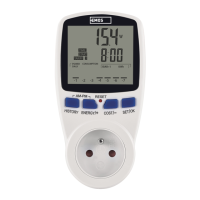

 To Next Page