Need help?
Do you have a question about the Emotiva UMC-200 and is the answer not in the manual?
Explains the meaning of warning symbols like exclamation points and lightning flashes within the manual.
Outlines crucial safety measures regarding water, heat, ventilation, installation locations, and proper use.
Details how to connect the UMC-200 to power amplifiers and a powered subwoofer for audio output.
Explains how to connect the UMC-200 to a TV or monitor via HDMI, including ARC and CEC features.
Guides on connecting video sources like cable boxes and Blu-Ray players via HDMI inputs.
Explains how to connect audio-only sources or use alternate audio connections with video sources.
Details how to operate the UMC-200 using buttons and the display on the front panel.
Explains how to use the included remote control for basic functions like volume, input selection, and mode changes.
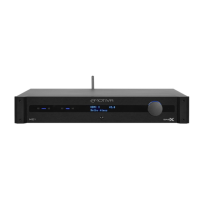
Details the function of each button, port, and the display on the UMC-200's front panel.
Describes all the input and output connections available on the rear panel of the UMC-200.
Explains the functions of all buttons on the UMC-200 remote control for comprehensive operation.
Details the EmoQ Gen2 process for automatic room correction and speaker calibration.
Explains the feature that allows watching video from one source while listening to audio from another.
Describes the mode that allows video and audio pass-through to the TV while the UMC-200 is in standby.
Details how to control audio output for two additional zones (Zone 2 and Zone 3).
Covers basic menu operations including input selection, mode changes, and trim adjustments.
Guides configuring input settings and default parameters for Zone 2 and Zone 3.
Details associating decoder modes and manually configuring speaker parameters.
Explains selecting and adjusting equalization curves, including EmoQ and manual settings.
Covers OSD transparency, HDMI CEC, standby video, loading defaults, and firmware versions.
Lists all video and audio input/output ports, Bluetooth, antenna, and IR/trigger connections.
Provides physical dimensions (unboxed/boxed) and weight of the UMC-200.
Provides instructions on how to safely clean the UMC-200 unit and its remote control.
Addresses common problems like no power, no video, no audio, and remote control issues with solutions.
Explains what the warranty covers, its duration, and how to initiate a warranty claim.
Outlines the procedure for getting service and discusses legal rights and disclaimers related to the warranty.
 General
| Channels | 7.1 |
|---|---|
| HDMI Inputs | 6 |
| HDMI Outputs | 2 |
| Digital Audio Inputs | 3 (2 Optical, 1 Coaxial) |
| Zone Outputs | 1 |
| DAC Resolution | 24-bit/192kHz |
| Analog Stereo Inputs | 4 |
| Coaxial Inputs | 1 |
| Optical Inputs | 2 |
| 7.1-channel analog Outputs | Yes |
| Audio Processing | Dolby TrueHD, DTS-HD Master Audio, Dolby Digital Plus, DTS |
| Audio Decoding | Dolby Digital, Dolby Digital Plus, Dolby TrueHD, DTS, DTS-HD Master Audio, DTS-ES |
| Analog Audio Inputs | 4 |
| Control | RS-232, IR, Ethernet |
| Video Support | 3D, Deep Color, x.v.Color |

 To Next Page