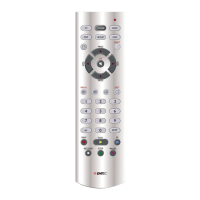
1. Press and hold SETUP (4) until the LED indicator (1) lights steadily. Release
SETUP.
2. Press and hold MUTE (10) until the LED (1) blinks once. Release MUTE.
3. Pressonceonthemodekey(TV,VCR,…)correspondingtothedevicewhose
volume will always be controlled by the VOL (8) and MUTE (10) keys.
4. Press the VOL-(8) key once.
5. Press the MUTE (10) key once.
10) Problems and troubleshooting
The remote doesn’t work or loses codes entered
· Conrmwithyouroriginalremotethattheequipmentworks
correctly.
· Make sure that you have pressed the corresponding mode key of
the equipment or device that you want to control.
· If the listed code does not work , try the AUTOSEARCH method
or enter the next code of that brand.
· Tondthecorrespondingcodeforyourequipmentusetheautoma-
tic search.
· Check that the batteries have the correct polarity position.
· The programming of the remote requires 2 AAA alkaline batteries
(new). If the remote loses codes within a few days/weeks the problem
can be solved by using 2 new batteries from the same brand.
· If the LED is lit permanently, in general it will be necessary to
replace the batteries.
Important:
The 8 in 1 Universal Remote Control must be used only in the way
described in this instruction manual and may not be used for a purpose
not intended.
GB


 To Next Page