+ Add device
5
6
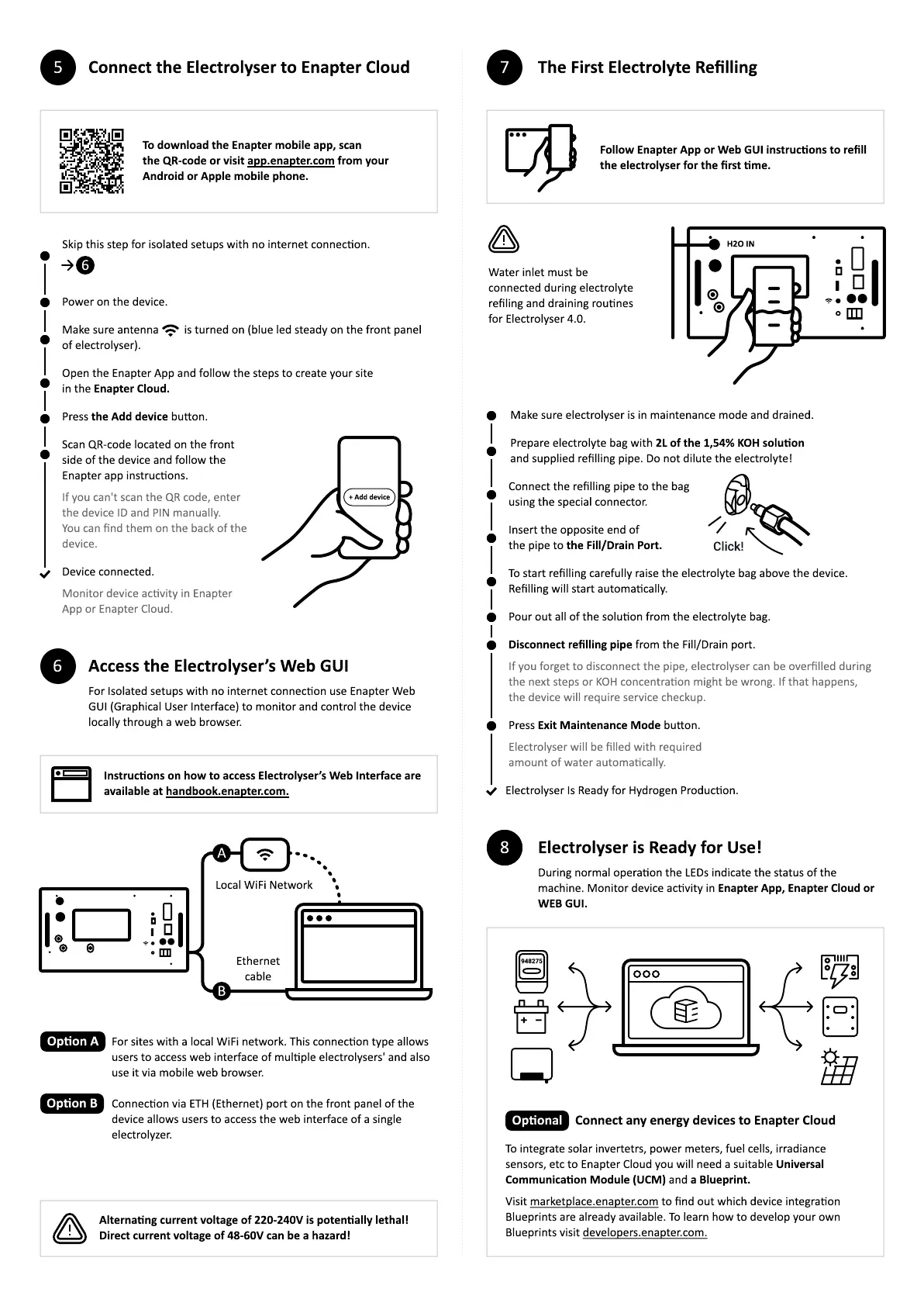
Connect the Electrolyser to Enapter Cloud
Access the Electrolyser’s Web GUI
Open the Enapter App and follow the steps to create your sit
in the Enapter Cloud.
Make sure antenna is turned on (blue led steady on the front panel
of electrolyser).
Power on the device.
Press the Add device buon.
Scan QR-code located on the front
side of the device and follow the
Enapter app instrucons.
Device connected.
To download the Enapter mobile app, sca
the QR-code or visit app.enapter.com from your
Android or Apple mobile phone.
6
Skip this step for isolated setups with no internet connecon.
For Isolated setups with no internet connecon use Enapter Web
GUI (Graphical User Interface) to monitor and control the device
locally through a web browser.
Insert the opposite end o
the pipe to the
F
ill
/D
rain
P
ort.
C
onnect the re
lling pipe to the bag
using the special connector.
Press E
x
it
M
aintenance
M
ode buon.
Electrolyser Is Ready for
H
ydrogen Producon.
Prepare electrolyte bag with
2L
of the
1
,
54%
KOH
solu
on
and supplied re
lling pipe. Do not dilute the electrolyte
!
Make sure electrolyser is in maintenance mode and drained.
Instruc
ons on how to access Electrolyser’s Web Interface are
available at handboo
k
.enapter.com.
Water inlet must be
connected during electrolyte
re
ling and draining rounes
for Electrolyser
4
.
0
.
F
ollow Enapter App or Web GUI instruc
ons to re
ll
the electrolyser for the
rst
me.
For sites with a local WiFi network.
T
his connecon type allows
users to access web interface of mulple electrolysers
'
and also
use it via mobile web browser.
C
onnecon via E
TH
(Ethernet) port on the front panel of the
device allows users to access the web interface of a single
electroly
z
er.
7
The
F
irst Electrolyte Re
llin
g
H2O
I
N
Click!
T
o start re
lling carefully raise the electrolyte bag above the device.
Re
lling will start automacally.
Pour out all of the soluon from the electrolyte bag.
D
isconnect re
llin
g
pipe from the Fill
/
Drain port.
Electrolyser is Ready for Use
!1
0
During normal operaon the
L
EDs indicate the status of the
machine. Monitor device acvity in Enapter App, Enapter Cloud or
WE
B
GUI.
8
Etherne
cable
L
ocal WiFi
N
etwork
A
B
O
p
on A
O
p
on
B
V
isit marketplace.enapter.com to
nd out which device integraon
B
lueprints are already available.
T
o learn how to develop your own
B
lueprints visit developers.enapter.com.
T
o integrate solar invertetrs
,
power meters
,
fuel cells
,
irradiance
sensors
,
etc to Enapter
C
loud you will need a suitable Universal
Communica
on
M
odule
(
UC
M
)
and a
B
lueprint.
Connect any ener
g
y devices to Enapter Cloud
948275
O
p
onal
Alterna
n
g
current volta
g
e of
22
0
-
24
0V
is poten
ally lethal
!
D
irect current volta
g
e of
4
8
-
60V
can be a ha
z
ard
!


 To Previous Page
 Loading...