3938
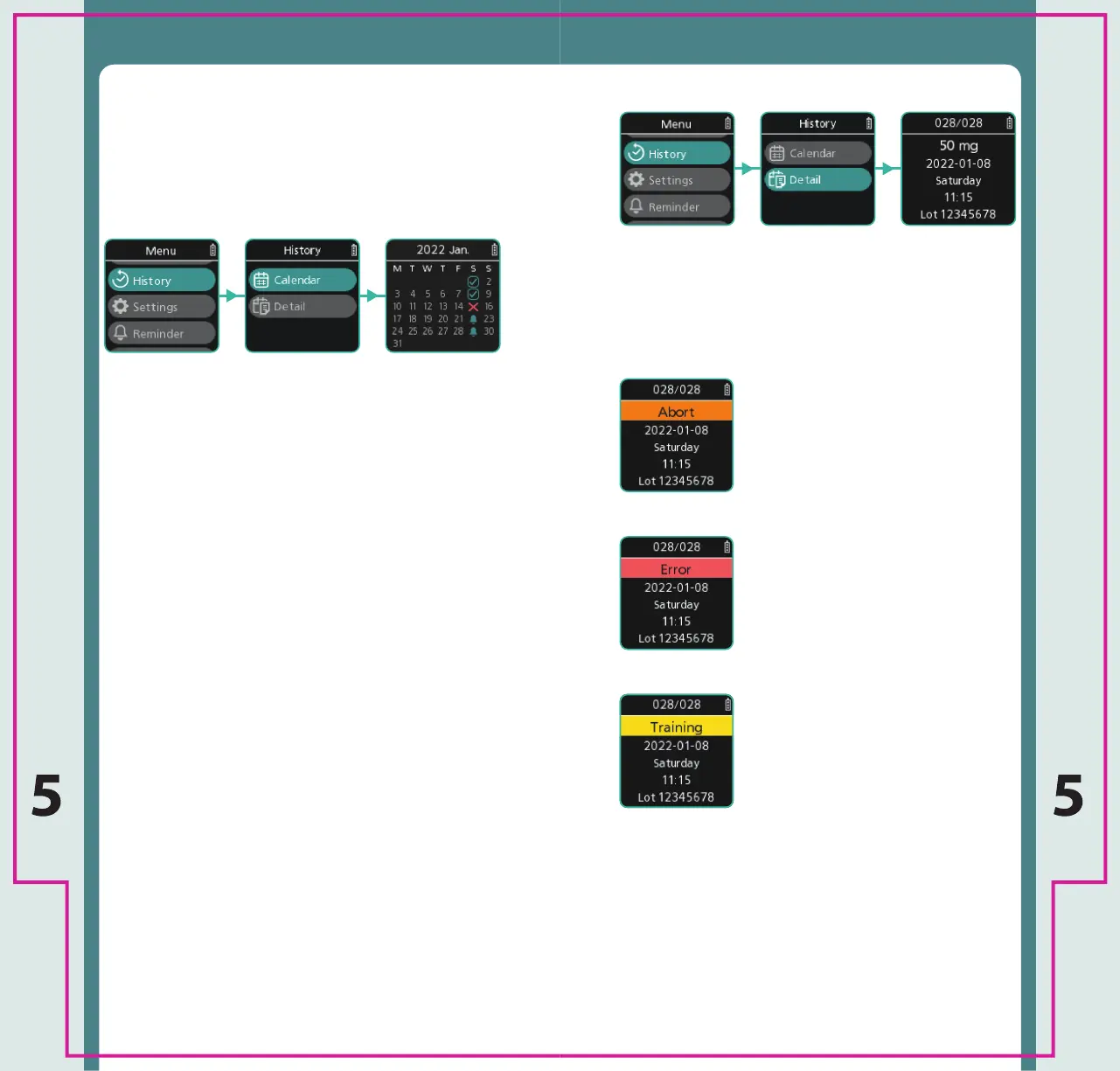
z Select Detail to view your injection history in a
text format.
z Use the Menu up and Menu down buttons to
scroll through your injection history.
z Return to the previous screen with a short press
of the Cancel/Eject button.
z Return to the Home Screen by holding down the
Cancel/Eject button.
z Select History to view information about your
injection history.
z You can view your injection history as a calender
or in a detailed text format.
z Select Calendar to view your injection history in a
calendar month format.
} The tick represents previous completed
injections.
} The cross represents injection errors.
} The bell represents scheduled injections in the
future.
z Use the Menu up and Menu down buttons to
scroll through your injection history.
z Return to the previous screen with a short press
of the Cancel/Eject button.
z Return to the Home Screen by holding down the
Cancel/Eject button.
History Calendar
History Detail
History History
z [Abort] represents a Cartridge
was ejected without injection
after removing the needle cap.
z [Error] represents that the
injection did not complete due
to an error.
z [Training] represents a training
operation using a Training
Cartridge.



 To Next Page