E9 OP REV.A1
15
F Button LCD display Button
Press and hold the F
Button for 4 second
until 4 beeps sounded
DEMO mode Press button to activate
Backlight will be ON until
DEMO operation end.
Table 5: Do-Re-Mi sounds to confirm
F Button LCD display Button
Press and hold the F
Button for 6 second
until Do-Re-Mi
sounded
DEFLT flashing Press & hold button for 2
seconds to back to default
setting and 1 chip for confirm
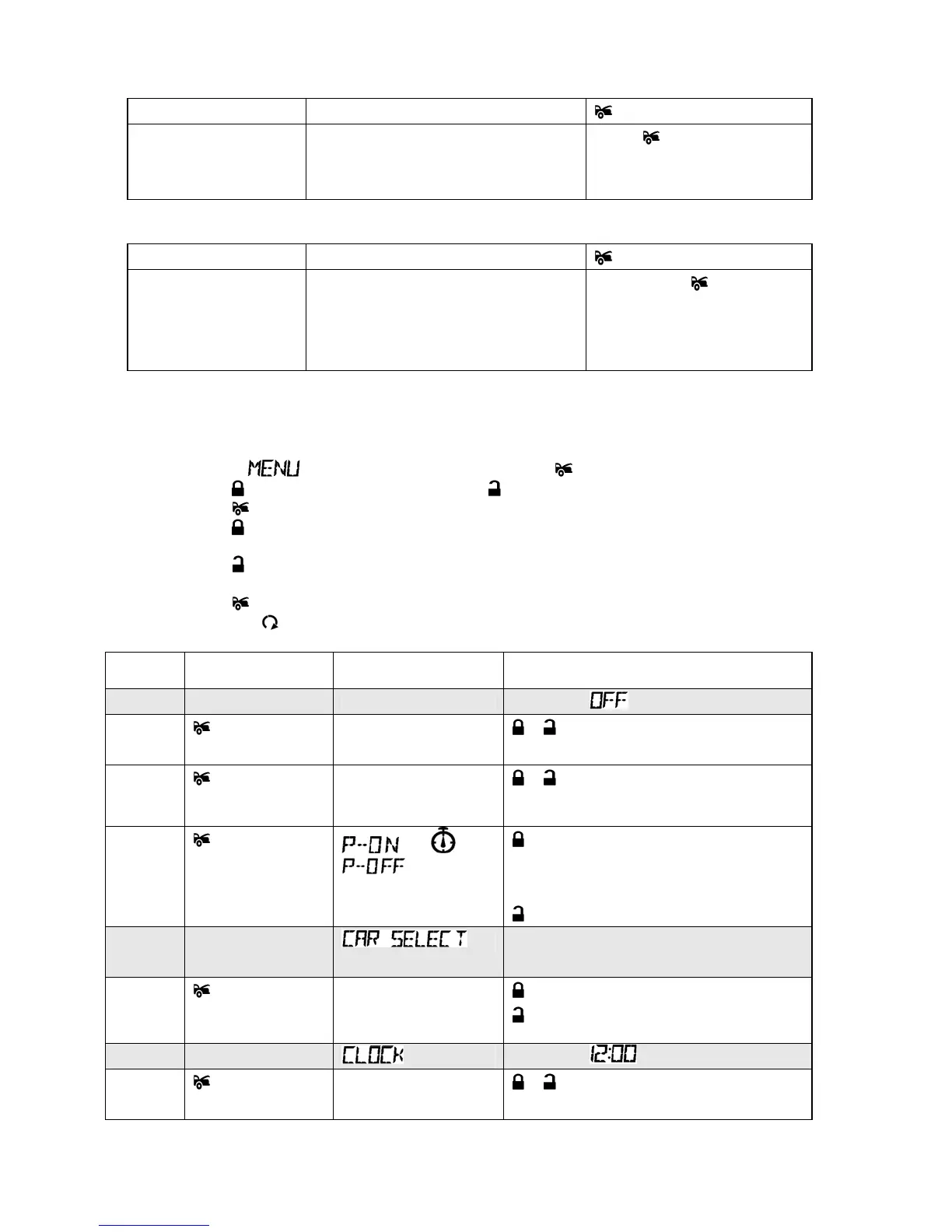
D. PROGRAMMING LCD REMOTE (Transmitter Manual mode):
Selecting and Adjusting Menu options:
• Press and hold
F button for 1 second until 2 beeps sound, then release the F button.
• The text
will flash on the LCD screen, press button to enter the menu.
• Press
button to move up in the menu or button to move down in the menu.
• Press
button to select the option you would like to adjust.
• Press
button to increase the value, to activate or deactivate a function or to toggle through
the selection.
• Press
button to decrease the value, to activate or deactivate a function or to toggle
• through the selection.
• Press
button to move to the next sub-option or go back to the main menu.
• EXIT: Press
button to exit the menu mode.
Trans
mode
Menu Option LCD display Functions
1 Parking Menu PARK METER Default is
- Parking hours 0:30
0 is flashing
, - Adjusts parking hour
(value from 0 to 2).
- Parking
minutes
0:30
30 is flashing
, - Adjusts parking minute
(value from 0 to 59).
- Toggle
Parking
countdown
+ or
- Enables parking countdown.
There is a beep 5 min. before the
Parking countdown reaches 0.
- Disables parking countdown.
2 Second Vehicle
Operation Menu
Default is CAR 1
- Car Select CAR 1 or
CAR 2
-CAR 1 operation.
- CAR 2 operation.
3 Clock Menu Default is
- Clock hours
12:00AM
12 is flashing
, - Adjusts clock hour from 0 to 12



 To Next Page