EasyManua.ls Logo

Encore ENM232-6CMI - User Manual

Encore ENM232-6CMI
37 pages
Print Icon
To Next Page IconTo Next Page
Loading...
ENM232-6CMI
5.1 CHANNEL SURROUND
SOUND CARD
User Manual
Question and Answer IconNeed help?

Do you have a question about the Encore ENM232-6CMI and is the answer not in the manual?

Summary

FCC and CE Radiation Norm

Features

System Requirements

Package Contents

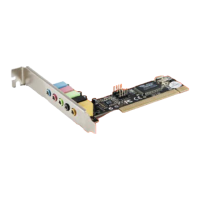
Hardware Interfaces

MIC

This port is for Microphone-in.

LINE IN

This port is for Audio Line-in.

SPK1

This port is for Left and Right Front audio speakers.

SPK2

This port is for Left and Right Rear audio speakers.

CENTER;BASS

This port is for Center & Subwoofer (LFE) audio speakers.

MIDI;GAME

This port is for MIDI/Gamepad device.

CD-IN

This port is for CD-IN with L-G-G-R pin assignment.

Hardware Installation

Driver Installation

Launch the Application Software

Technical Support

Summary

FCC and CE Radiation Norm

Features

System Requirements

Package Contents

Hardware Interfaces

MIC

This port is for Microphone-in.

LINE IN

This port is for Audio Line-in.

SPK1

This port is for Left and Right Front audio speakers.

SPK2

This port is for Left and Right Rear audio speakers.

CENTER;BASS

This port is for Center & Subwoofer (LFE) audio speakers.

MIDI;GAME

This port is for MIDI/Gamepad device.

CD-IN

This port is for CD-IN with L-G-G-R pin assignment.

Hardware Installation

Driver Installation

Launch the Application Software

Technical Support

Encore ENM232-6CMI Specifications

General IconGeneral
BrandEncore
ModelENM232-6CMI
CategorySound Card
LanguageEnglish

Related product manuals