Installation
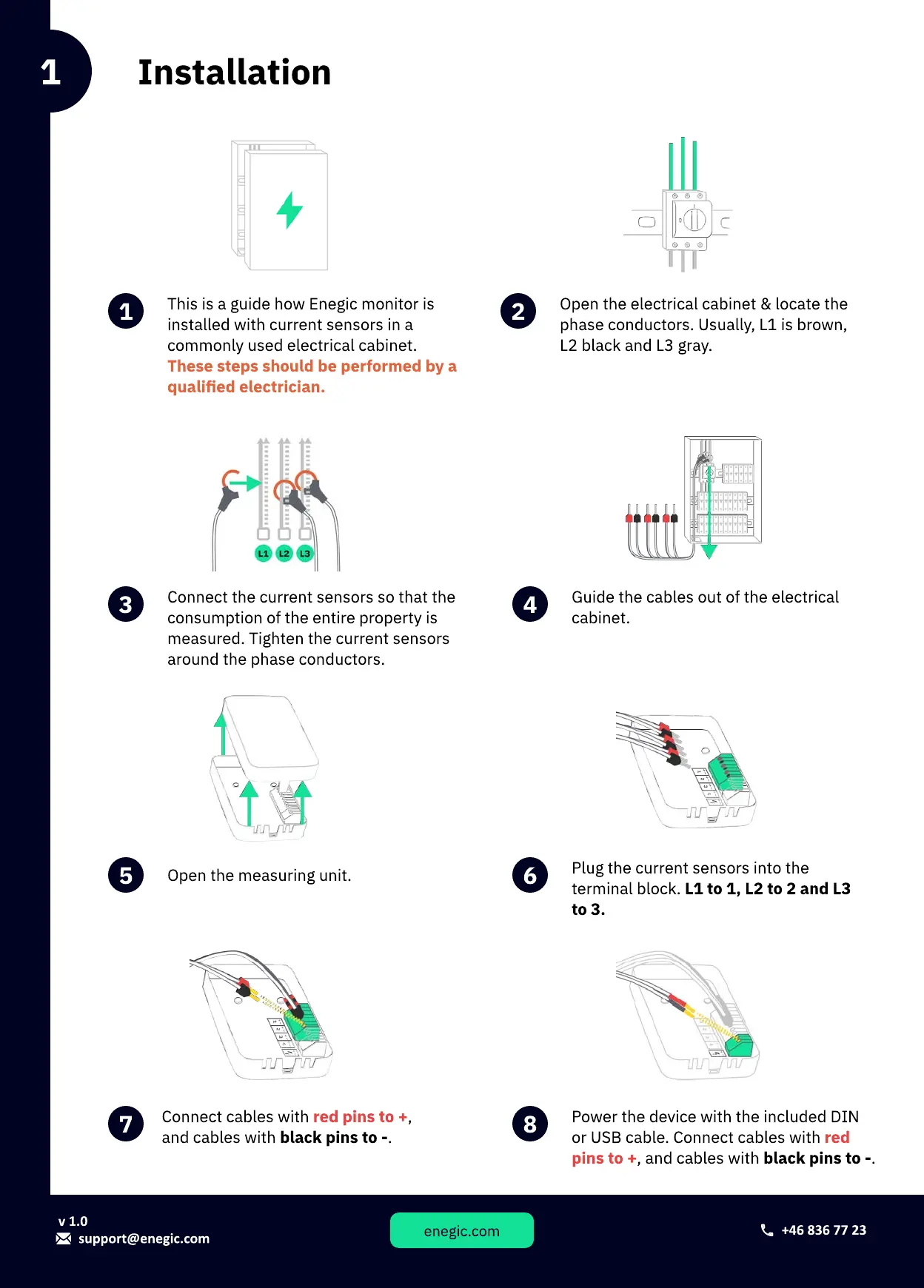
This is a guide how Enegic monitor is
installed with current sensors in a
commonly used electrical cabinet.
These steps should be performed by a
qualied electrician.
1
Open the electrical cabinet & locate the
phase conductors. Usually, L1 is brown,
L2 black and L3 gray.
2
Connect the current sensors so that the
consumption of the entire property is
measured.Tighten the current sensors
around the phase conductors.
3 4
Guide the cables out of the electrical
cabinet.
Open the measuring unit.
5 6
Plug the current sensors into the
terminal block. L1 to 1, L2 to 2 and L3
to 3.
Connect cables with ,
and cables with black pins to -.
red pins to +
7 8
Power the device with the included DIN
or USB cable. Connect cables with
, and cables with black pins to -.
red
pins to +
1
support@enegic.com
v
1
.
0
enegic.com
+46
836
77
23



 To Next Page