INSTALLATION
OPTION 1: Table Top
STEP 1
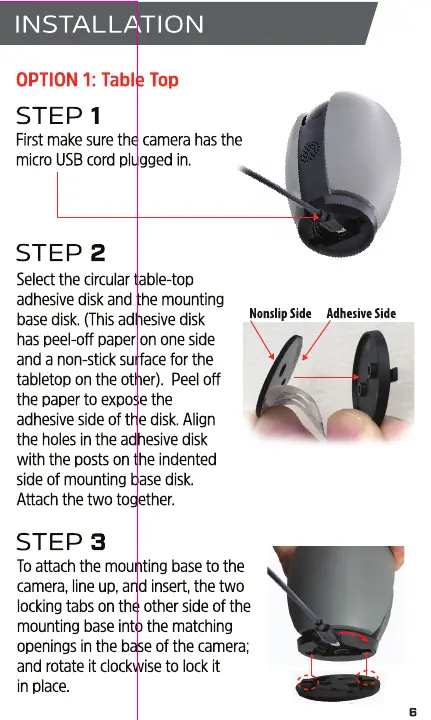
First make sure the camera has the
micro USB cord plugged in.
STEP 2
Select the circular table-top
adhesive disk and the mounting
base disk. (Thisadhesive disk
has peel-off paper on one side
and a non-stick surface for the
tabletop on the other). Peel off
the paper to expose the
adhesive side of the disk. Align
the holes in the adhesive disk
with the posts on the indented
side of mounting base disk.
Attach the two together.
STEP 3
NonslipSide
Adhesive Side
Toattach the mounting base to the
camera, line up, and insert, the two
locking tabs on the other side of the
mounting base into the matching
openings in the base of the camera;
and rotate it clockwise to lock it
in place.


 To Next Page