Multi-Function Gigabit Wireless-N Client Bridge Version 2.0
41
•
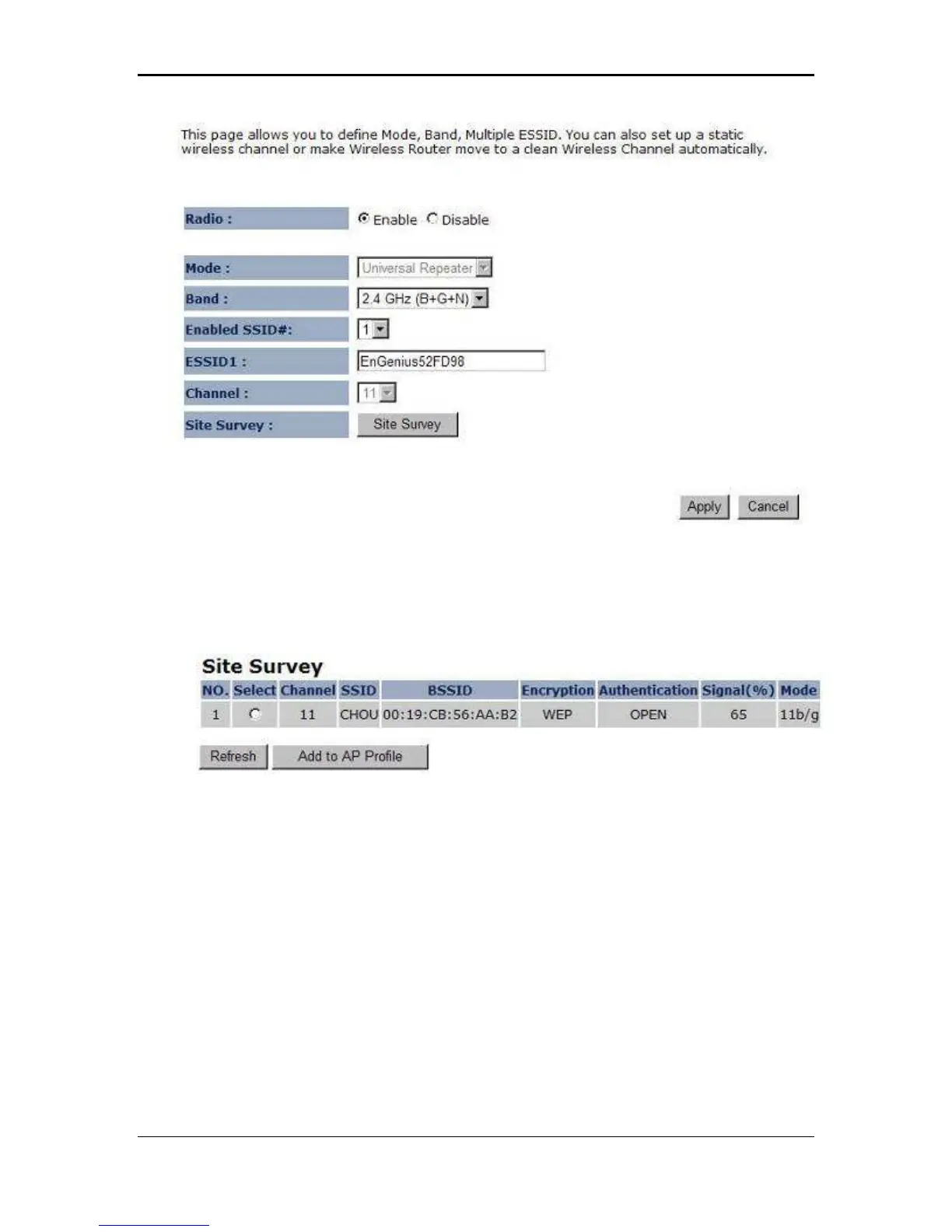
Site Survey
: Click on the Site Survey button to view a list of Access Points in the area. The
Site Survey page displays information about devices within the 802.11b/g/n frequency.
Information such as channel, SSID, BSSID, encryption, authentication, signal strength, and
operating mode are displayed. Select the desired device and then click on the Add to AP
Profile button.
SSID: The SSID is a unique named shared amongst all the points of the wireless
network. The SSID must be identical on all points of the wireless network and cannot
exceed 32 characters.
Status: Displays the current status of the device.
Channel: The channels available are based on the country’s regulation. A wireless
network uses specific channels in the wireless spectrum to handle communication
between clients. Some channels in your area may have interference from other
electronic devices.
Click on the Apply button to save the changes.
3.2.4.5.3 Advanced
Click on Advanced link under the Wireless drop-down menu. This page allows you
to configure the fragmentation threshold, RTS threshold, beacon period, transmit
power, DTIM Period, etc.



 To Next Page