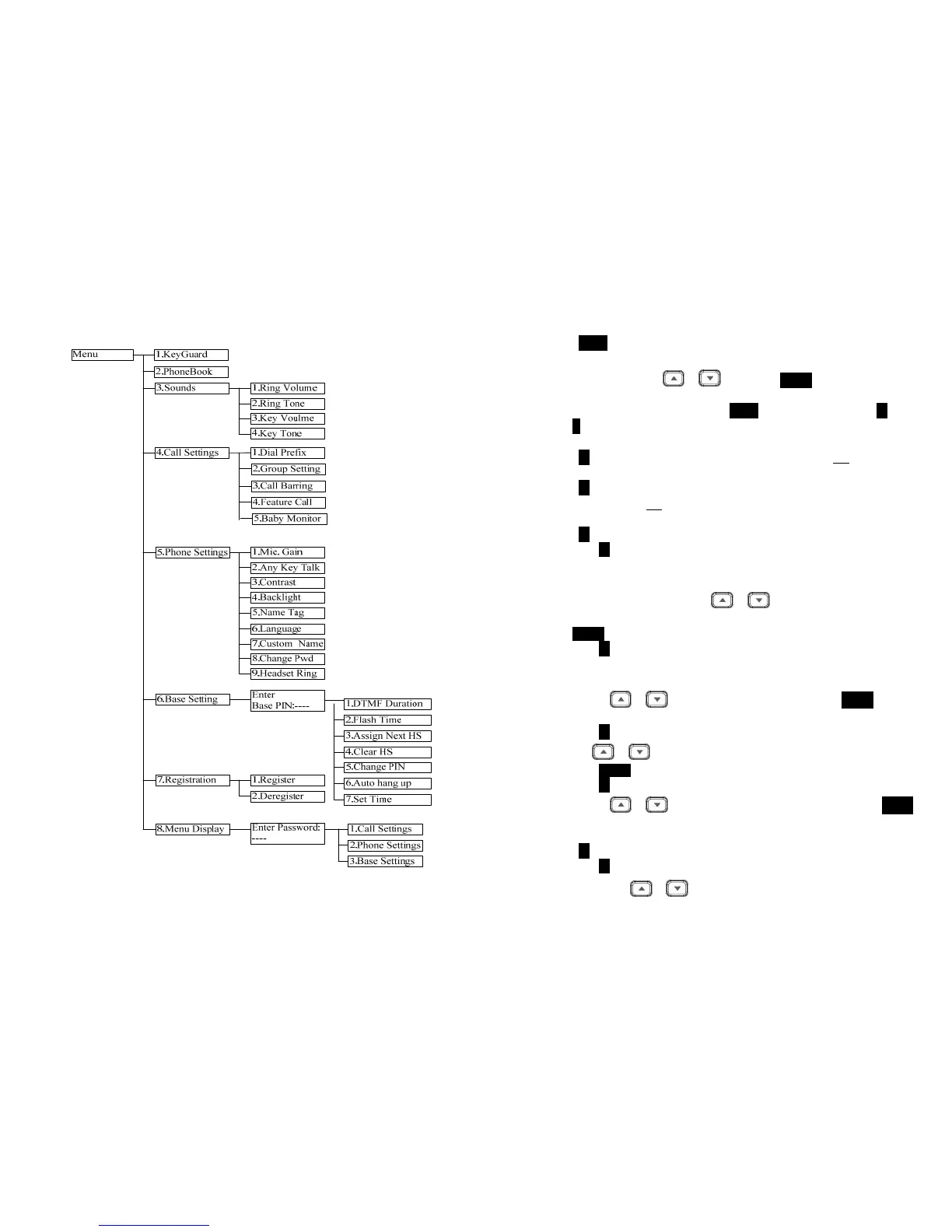
1. Press MENU right soft key to enter menu mode while the phone is in standby
mode.
Re: You can either press or , followed by SELECT left soft key to
confirm the selected menu. Or Press the digit directly to confirm the
selected menu. For example, press MENU right soft key followed by 4 and
1 to select Ring Volume.
2. Press 1 to select KeyGuard (see Key Guard operation on page 34 ).
3. Press 2 to add, delete, edit, view and edit the phonebook (see Phonebook
instructions on page 39 ).
4. Press 3 to set Sound settings:
a. Press 1 to select Ring Volume:
There are two options for ring volume: Line (for incoming call) and Intercom
(for intercom calls). Set each option respectively.
When setting each option, use or to scroll through 6 options:
“Off”, “Low”, “Medium”, “High”, “Vibrate” and “Vibrate & High”. Press
SELECT left soft key to save selection. Default = Medium.
b. Press 2 to select Ring Tone:
There are two options for ring tone: Line (ring tone for incoming call) and
Intercom (ringer for intercom call). Set each option respectively.
Use the or to scroll through 8 ringer types, press SELECT left soft
key to save the selection. Default = 1.
c. Press 3 to select Key Volume for when a key is pressed:
Use or to scroll through 4 options: Off, Low, Medium, and High.
Press SELECT left soft key to save selection. Default = Medium.
d. Press 4 to select Key Tone for when a key is pressed:
Use the or to scroll through 4 options: 1, 2, 3 and 4. Press SELECT
left soft key to save selection. Default = 1.
5. Press 4 to set Call Settings:
a. Press 1 to set Dial Prefix:
(1)
Press or to turn on or off the dial prefix feature. Default =



 To Next Page