18
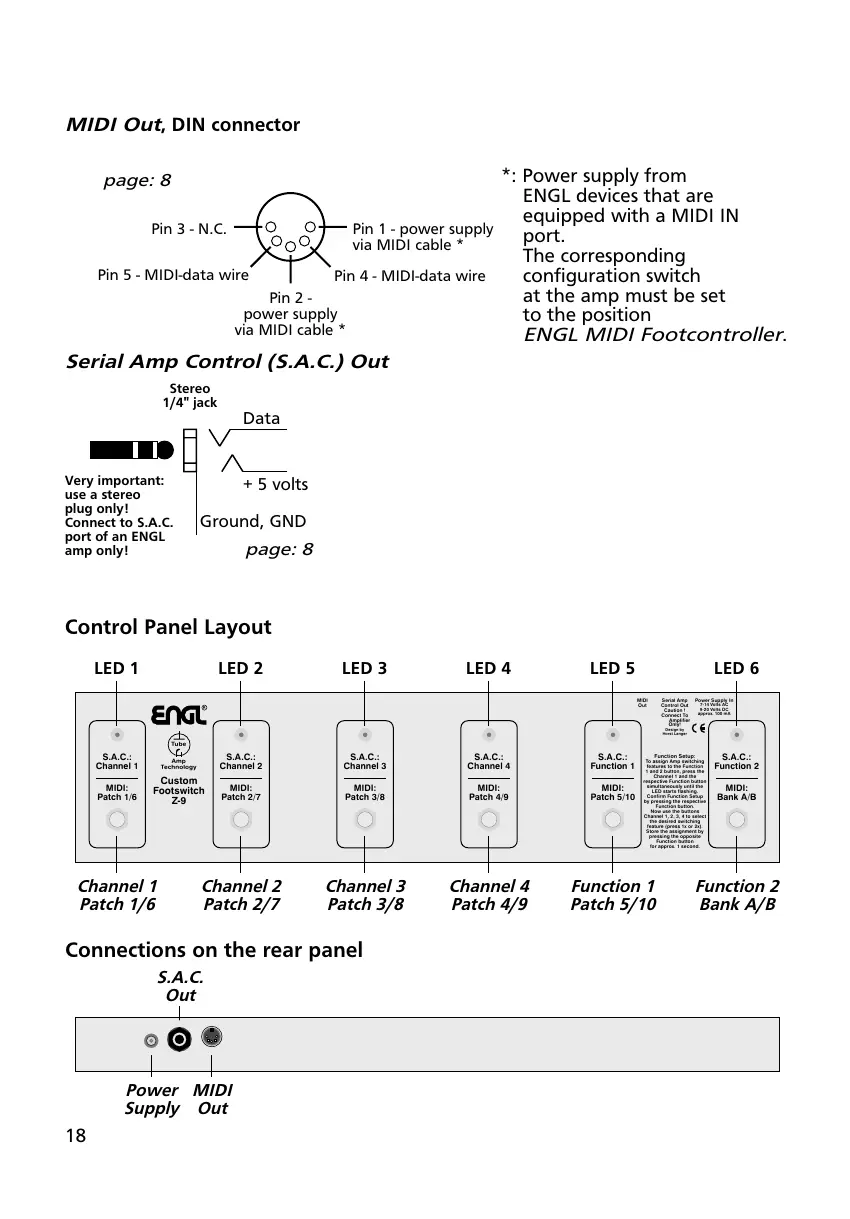
*: Power supply from
ENGL devices that are
equipped with a MIDI IN
port.
The corresponding
configuration switch
at the amp must be set
to the position
ENGL MIDI Footcontroller.
MIDI Out, DIN connector
Stereo
1/4" jack
Serial Amp Control (S.A.C.) Out
+ 5 volts
Data
Ground, GND
Very important:
use a stereo
plug only!
Connect to S.A.C.
port of an ENGL
amp only!
page: 8
R
Amp
Technology
Tube
Custom
Footswitch
Z-9
S.A.C.:
Channel 1
S.A.C.:
Channel 2
S.A.C.:
Channel 3
S.A.C.:
Channel 4
S.A.C.:
Function 1
S.A.C.:
Function 2
MIDI:
Patch 1/6
MIDI:
Patch 2/7
MIDI:
Patch 3/8
MIDI:
Patch 4/9
MIDI:
Patch 5/10
MIDI:
Bank A/B
Power Supply In
7-14 Volts AC
9-20 Volts DC
approx. 100 mA
MIDI
Out
Serial Amp
Control Out
Caution !
Connect To
Amplifier
Only!
Design by
Horst Langer
Function Setup:
To assign Amp switching
features to the Function
1 and 2 button, press the
Channel 1 and the
respective Function button
simultaneously until the
LED starts flashing.
Confirm Function Setup
by pressing the respective
Function button.
Now use the buttons
Channel 1, 2, 3, 4 to select
the desired switching
feature (press 1x or 2x).
Store the assignment by
pressing the opposite
Function button
for approx. 1 second.
Channel 1
Patch 1/6
Channel 2
Patch 2/7
Channel 3
Patch 3/8
Channel 4
Patch 4/9
Function 1
Patch 5/10
Function 2
Bank A/B
LED 1 LED 2 LED 3 LED 4 LED 5 LED 6
Control Panel Layout
Connections on the rear panel
MIDI
Out
S.A.C.
Out
Power
Supply
page: 8
Pin 1 - power supply
via MIDI cable *
Pin 4 - MIDI-data wire
Pin 5 - MIDI-data wire
Pin 2 -
power supply
via MIDI cable *
Pin 3 - N.C.


 To Next Page