Need help?
Do you have a question about the Engl Z9 and is the answer not in the manual?
Explains how to select amp channels and functions using SAC mode with examples.
Guides on assigning sound-shaping and special functions to Function 1 and 2 buttons via setup routines.
Explains how to access and select MIDI patches in Banks A and B using the Z-9.
Table detailing sound-shaping and special function assignments for Function 1 and 2 on the E670.
Table detailing sound-shaping and special function assignments for Function 1 and 2 on the E570.
The ENGL Z-9 Custom Footswitch is a versatile foot controller designed to serve as the switching center for your guitar rig. It offers two primary remote control options: Serial Amp Control (S.A.C.) and MIDI, making it suitable for operating specific ENGL amplifiers and 19" rack devices, as well as MIDI-enabled amps and effect devices. The Z-9 boasts a rugged design housed in an elegant stainless steel chassis, reflecting ENGL's tradition of durable foot controllers.
In S.A.C. mode, the Z-9 is configured to remotely control specific ENGL amps and rack devices. It allows for direct channel selection via reciprocal triggering, meaning that pressing a button activates a new channel and deactivates the currently active one. The four channel buttons (Channel 1, 2, 3, 4) function as A/B switches for this purpose. Additionally, the Z-9 features two freely programmable buttons (Function 1 and Function 2) that can control sound-shaping and special functions on ENGL amps. These function buttons can also be integrated into the reciprocal triggering chain, providing direct access to features like Tube Driver and T.D.EQ on the ENGL Special Edition amp, or Preamp Defeat on the ENGL 570 Tube Preamp. The Z-9 also provides access to switchable Master A/B functions, for example, on the Special Edition Amp, which can be activated by pressing a channel selector button twice. Power in S.A.C. mode is supplied via a conventional stereo cord with 1/4" jack plugs connected to the amp's S.A.C. port.
In MIDI foot controller mode, the Z-9 selects 10 MIDI patches (MIDI Program Numbers or MPNs) organized into two banks, A and B, each containing five MPNs. This mode is active when the Z-9 is powered externally via a mains socket (power supply) or by an ENGL amp via a 5-pin DIN cord, provided the amp has a MIDI interface (MIDI IN) and the phantom power option is enabled. An outboard power unit is not required when phantom power is supplied via the MIDI cord. The Z-9's unique auto-configuration function detects the type of connected cord (stereo 1/4" jack for S.A.C. or 5-pin MIDI for MIDI mode) and configures itself accordingly. A significant advantage of the Z-9 is its dual remote control capability, allowing users to switch between MIDI and S.A.C. options if one cord type is damaged or unavailable.
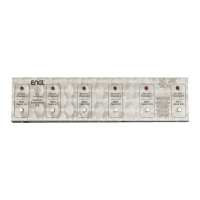
The Z-9's control panel includes six buttons, each with an associated LED indicator. In S.A.C. mode, buttons 1-4 select channels, and buttons 5 and 6 (Function 1 and Function 2) control programmable sound-shaping or special functions. LEDs 1-4 indicate the active channel, with a flashing LED signifying an active channel and an active special function (e.g., Clean and Master B). LEDs 5 and 6 indicate if Function 1 or Function 2 is active.
Configuring the Function 1 and Function 2 buttons involves a setup routine. To assign a sound-shaping or special function to Function 1, simultaneously press and hold Channel 1 and Function 1 until LED 5 flashes. Confirm by pressing Function 1. Then, use Channel buttons 1-4 to select the desired function, pressing once or twice to switch between options. The LED above the channel button will light continuously for one option and flash for the other. To store the new assignment, press and hold Function 2 until LED 6 lights up briefly. The Z-9 stores this configuration in nonvolatile memory. A similar process applies to configuring Function 2, initiated by holding Channel 1 and Function 2 until LED 6 flashes.
In MIDI mode, buttons 1-5 select MIDI patches 1-5 in Bank A, and patches 6-10 in Bank B. The Bank A/B button (button 6) switches between these banks. When switching banks, LED 6 and the LED of the most recently activated MPN flash. Pressing a MIDI Patch button selects the desired MPN, and LED 6 extinguishes for Bank A or lights up for Bank B. The Z-9 sends MIDI program change commands via MIDI channel 1.
The Z-9's auto-configuration is a key feature. When a stereo 1/4" jack is connected to the S.A.C. Out port, the unit automatically enters S.A.C. mode, indicated by LEDs 1-4 flashing as a light chain from right to left, and LEDs 5 and 6 flashing. When a 5-pin MIDI cord is connected and external power is supplied (either via mains or phantom power from an ENGL amp), the unit enters MIDI mode, indicated by LEDs 1-5 illuminating successively from left to right while LED 6 flashes.
To ensure the longevity of the Z-9 Custom Footswitch, several maintenance guidelines are provided. It is crucial to protect the foot controller from hard knocks and shocks. Storing the device in damp or dusty environments should be avoided to prevent damage to jacks and switches.
For cleaning the housing, only soft, damp cloths or sponges with diluted soapsuds or a mild dishwashing liquid should be used. Caustic or scouring detergents are explicitly prohibited, as are solvents, which can dissolve the top panel labels. Keeping liquids away from the foot controller, especially its interior, is essential to prevent damage.
The manual also includes troubleshooting tips for common issues, such as LEDs not lighting up, or the connected amp/effect device not responding to commands. These tips guide users through checking power supply connections, cable integrity (stereo 1/4" for S.A.C., 5-pin MIDI for MIDI), pin assignments, and proper configuration settings on both the Z-9 and the connected ENGL amp or MIDI device. It emphasizes that S.A.C., MIDI, and two-way footswitch options should not be combined, as plugging in a two-way footswitch disables the other remote control options.
 General
| Controls | Gain, Bass, Middle, Treble, Volume |
|---|---|
| Power Supply | 9V DC |
| Power | 9V |
| EQ | 3-Band (Bass, Middle, Treble) |
| Inputs | 1/4" |
| Outputs | 1/4" |
| Footswitchable | Yes |

 To Next Page