16
1
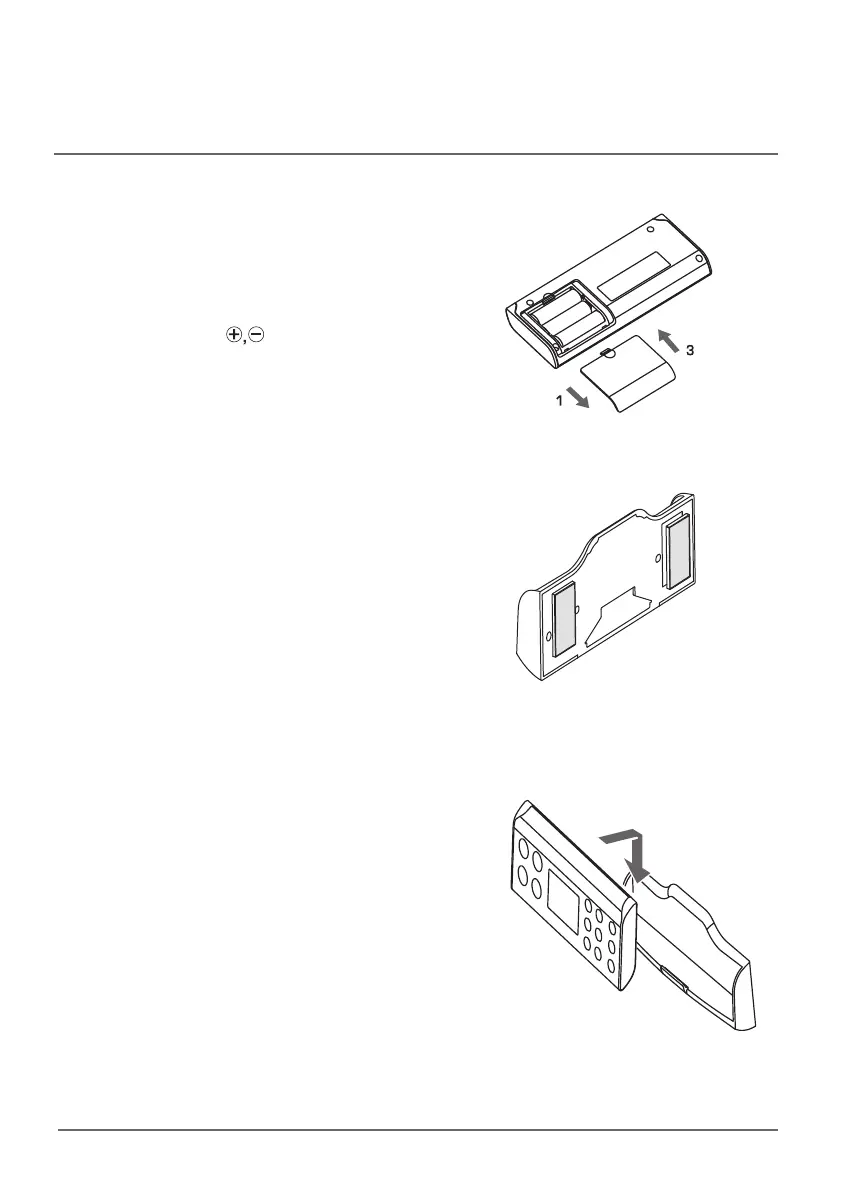
Insert three AA batteries.
1. Take out the remote controller from the
remote controller holder and open the battery
cover on the back side.
2. Insert three AA batteries (1.5V) while paying
attention to signs.
3. Close the battery cover.
2
Install the remote controller on the
wall.
1. Attach the double-stick tape on the back
side of the holder. Red side of the tape
should be visible.
* Once the holder is attached to the wall, it is EJGlDVMU
to remove. Therefore, it is recommended that the
proper location for the remote controller to be
installed should be determined before the holder is
attached on the wall
.
2. Thoroughly clean the area on the wall
where the holder is located, remove the red
cover from the double-stick tape and attach
the holder to the wall.
* Signal can be better received by the receiver if
the
remote controller holder is located as close as
possible to the main unit control panel.
3.
Put the remote controller into the holder, press
the dry button on the remote controller while
the sitting sensor is activated and check if the
product operates normally.
*
In the event that the product does not operate normally,
the remote controller holder has to be relocated to
another place where the remote controller normally
operates.
3
Put the remote controller into the
holder.
* $IFDLBOEDPOlSNJGUIFSFNPUFDPOUSPMMFSJTQSPQFSMZ
installed in the holder.
How to install the remote control



 To Next Page