ENNOLOGIC TRUE RMS MULTIMETER EM860T-QUICK-START GUIDE
2
Main User Panel
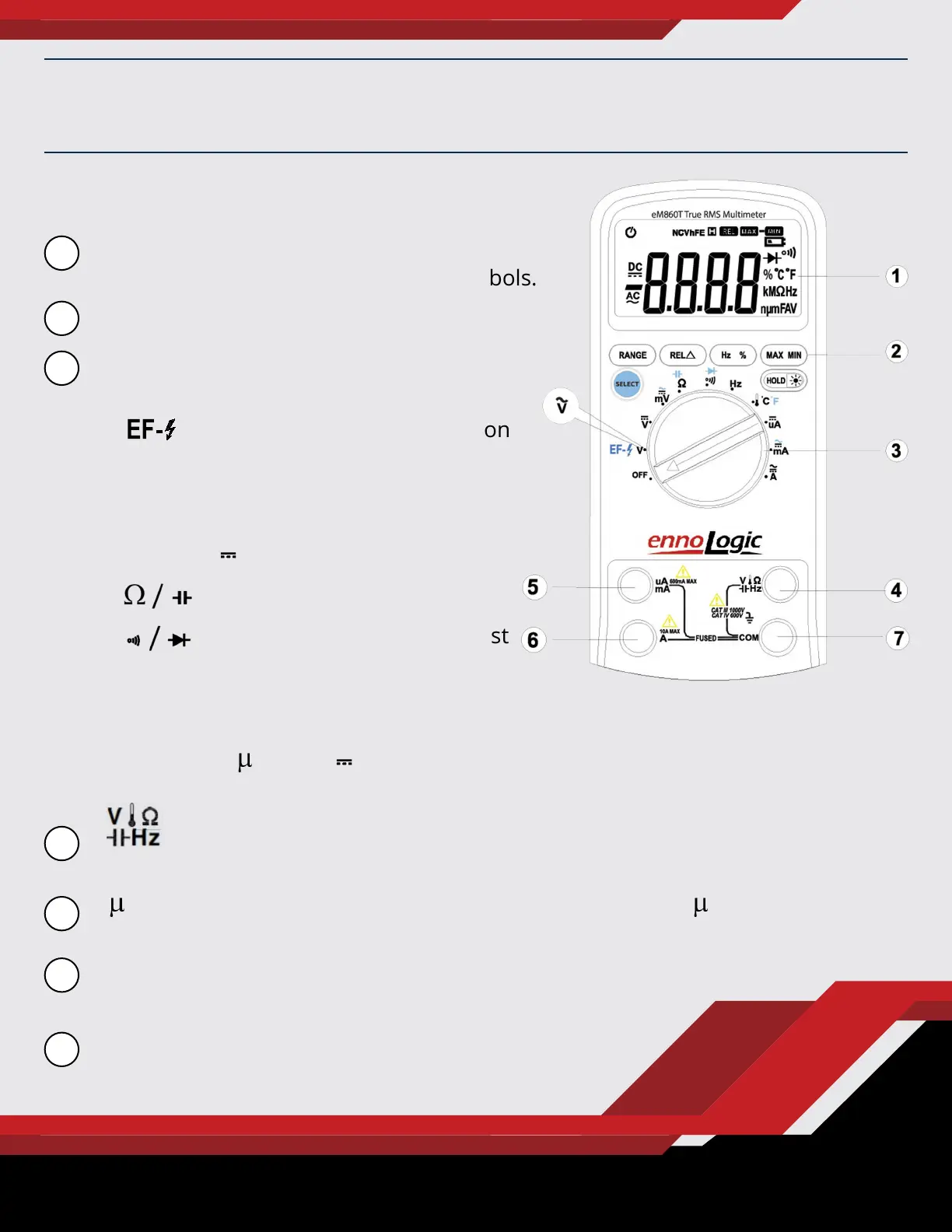
LCD display: Used for displaying
measurement results and various symbols.
Keypad: Measurement function keys.
Rotary switch: Used for selecting
measurement functions.
• - Non-Contact Voltage Detection
• V~ - AC Voltage
• V - DC Voltage
• mV (~ or ) – AC or DC Millivolts
• - Resistance / Capacitance
• - Continuity Check / Diode Test
• Hz – Frequency / Duty Cycle
• °C / °F - Temperature
• A, mA and A - (~ or ) – AC or DC Current
GETTING FAMILIAR WITH THE TRUE RMS MULTIMETER
: Connection terminal for the red test lead during voltage, resistance,
capacitance, frequency, temperature, diode and continuity measurements.
A/mA : Connection terminal for the red test lead during A and mA current
measurements.
A : Connection terminal for the red test lead during 6A
and 10A measurements.
COM : Connection terminal for the black test
lead (common reference.)
1
2
3
4
5
6
7


 To Next Page
 Loading...