4
Save these instructions for household use only.
Please read carefully before use:
• This product has no user serviceable parts.
• Store the charging unit onto a dry and safe place when it
is not in use.
•• Untwist the power cord before use.
• In case of breakdown or malfunction, do not dismantle,
exchange or manipulate any part of the product, to
avoid the risk of an electric shock. Please contact the
after-sales service.
•• If the supply cord is damaged, it must be replaced by the
manufacturer in order to avoid a hazard. Please contact
the after-sales service.
• If the product is dropped, the brush head should be
replaced before the next use even if no damage is visible
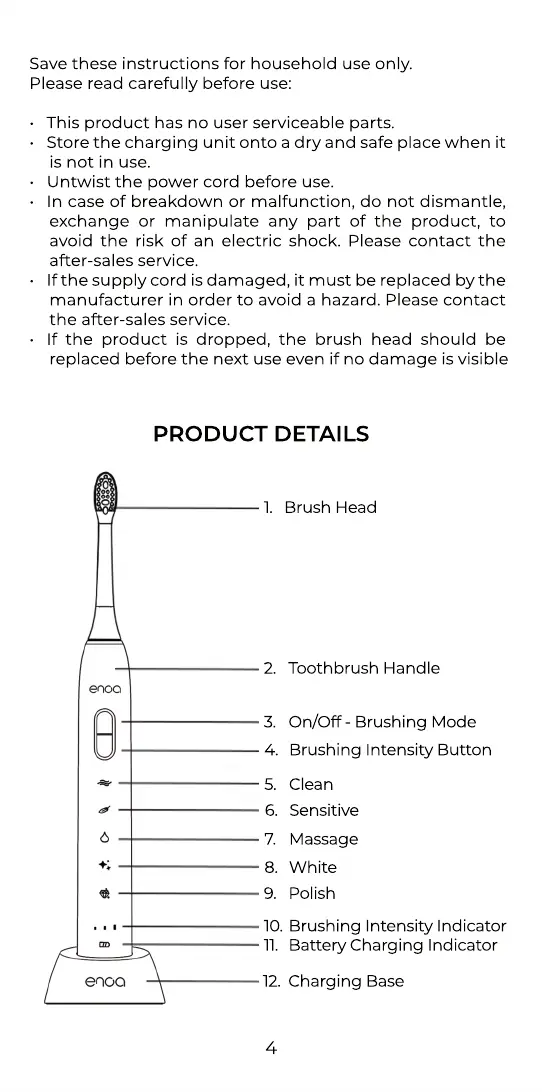
1. Brush Head
2. Toothbrush Handle
3. On/Off - Brushing Mode
4. Brushing Intensity Button
5. Clean
6. Sensitive
7. Massage
8. White
9. Polish
10. Brushing Intensity Indicator
11. Battery Charging Indicator
12. Charging Base
PRODUCT DETAILS



 To Next Page