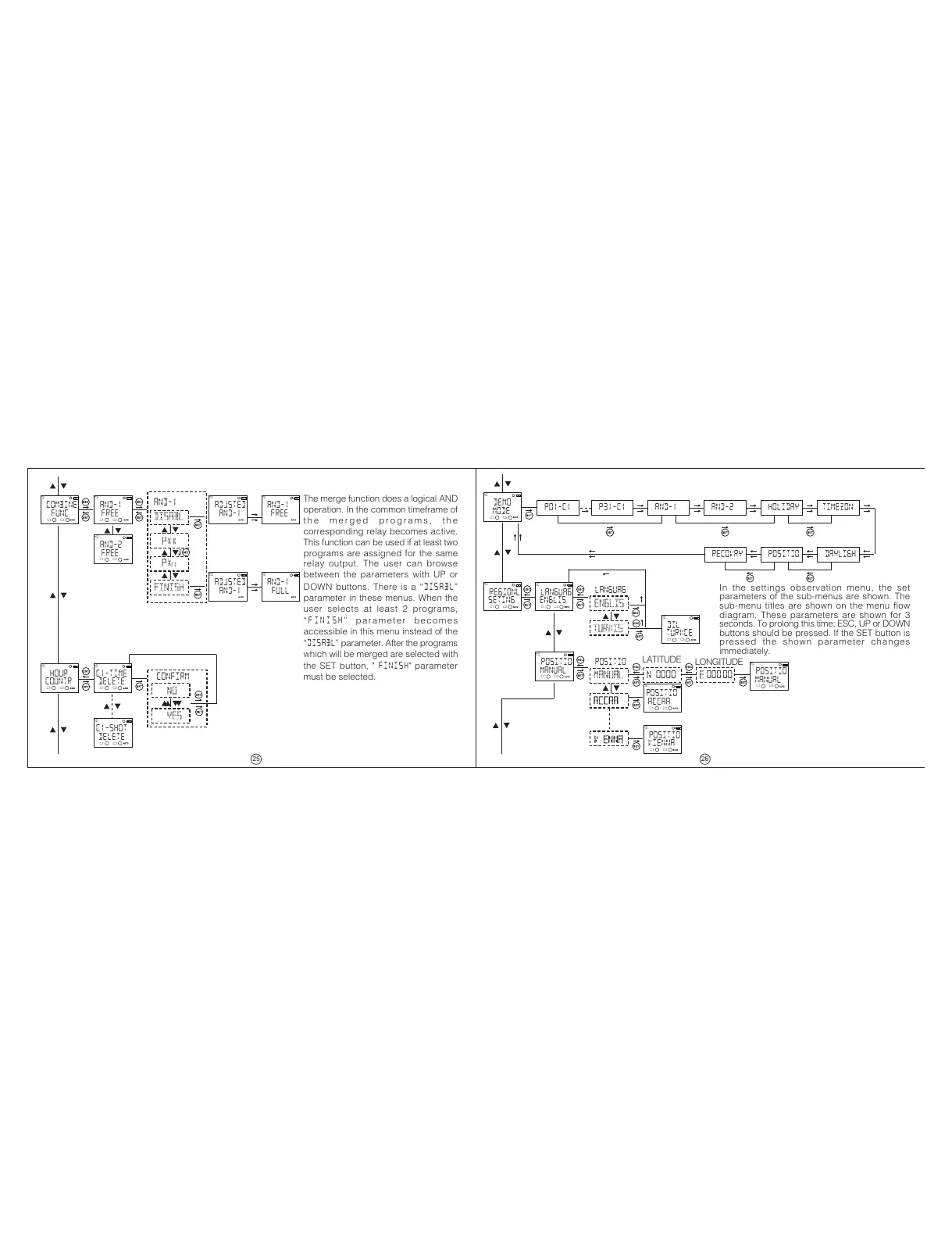
The merge function does a logical AND
operation. In the common timeframe of
t h e m e r g e d p r o g r a m s , t h e
corresponding relay becomes active.
This function can be used if at least two
programs are assigned for the same
relay output. The user can browse
between the parameters with UP or
DOWN buttons. There is a
DISABL
parameter in these menus. When the
user selects at least 2 programs,
F I N IS H pa r a me te r b e c om es
accessible in this menu instead of the
DISABL parameter. After the programs
which will be merged are selected with
the SET button,
" FINISH" parameter
must be selected.
In the settings observation menu, the set
parameters of the sub-menus are shown. The
sub-menu titles are shown on the menu flow
diagram. These parameters are shown for 3
seconds. To prolong this time; ESC, UP or DOWN
buttons should be pressed. If the SET button is
pressed the shown parameter changes
immediately.
C1-SHOT
MO
DELETE
C1-TIME
MO
DELETE
HOUR
MO
COUNTR
COMBINE
MO
FUNC
AND-1
MO
FREE
AND-2
MO
FREE
ADJSTED
MO
AND-1
AND-1
MO
FREE
ADJSTED
MO
AND-1
AND-1
MO
FULL
AND-1
DISABL
PXX
PX
FINISH
NO
YES
CONFIRM
DEMO
MO
MODE
PO1-C1 P31-C1 AND-1 AND-2 HOLIDAY
TIMEZON
DAYLIGHPOSITIORECOVRY
REGIONL
MO
SETING
DIL
MO
TURKCE
POSITIO
MO
MANUAL
LANGUAG
MO
ENGLIS
POSITIO
MO
ACCAA
POSITIO
MO
VIENNA
POSITIO
MO
MANUAL
ENGLIS
LANGUAG
TURKIS
MANUaL
POSITIO
accaa
výenna
N 0000 E 000.00
LATITUDE
LONGITUDE
C1: C2: C1: C2:
C1: C2:
C1: C2:
C1: C2:
C1: C2:
C1: C2:
C1: C2: C1: C2:
C1: C2:
C1: C2:
C1: C2:
C1: C2:
C1: C2:
25
26


 To Next Page
 Loading...