9 10
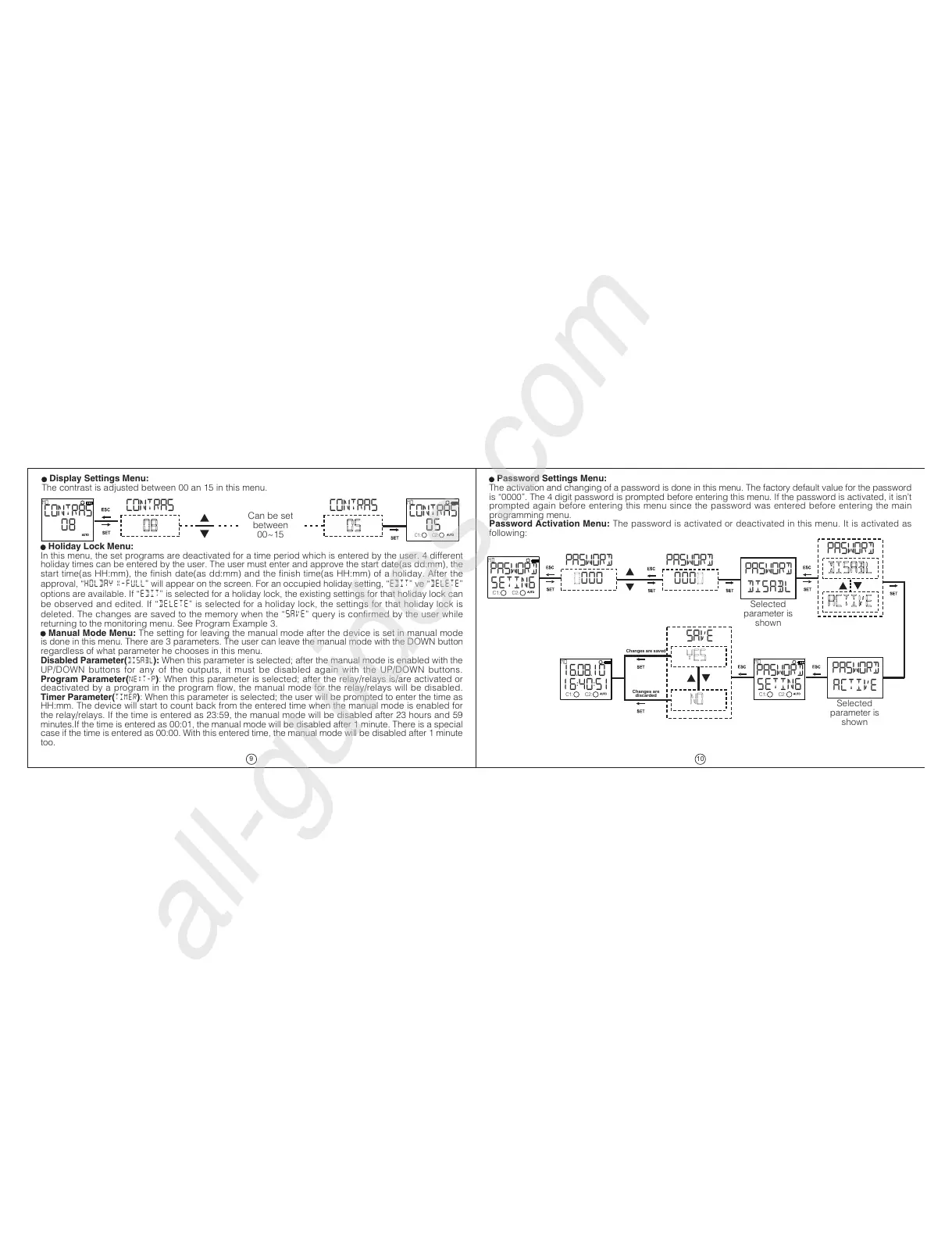
Display Settings Menu:
The contrast is adjusted between 00 an 15 in this menu.
Holiday Lock Menu:
In this menu, the set programs are deactivated for a time period which is entered by the user. 4 different
holiday times can be entered by the user. The user must enter and approve the start date(as dd:mm), the
start time(as HH:mm), the finish date(as dd:mm) and the finish time(as HH:mm) of a holiday. After the
approval, HOLDAY X-FULL will appear on the screen. For an occupied holiday setting, EDIT ve DELETE
options are available. If EDIT is selected for a holiday lock, the existing settings for that holiday lock can
be observed and edited. If DELETE is selected for a holiday lock, the settings for that holiday lock is
deleted. The changes are saved to the memory when the SAVE query is confirmed by the user while
returning to the monitoring menu. See Program Example 3.
Manual Mode Menu: The setting for leaving the manual mode after the device is set in manual mode
is done in this menu. There are 3 parameters. The user can leave the manual mode with the DOWN button
regardless of what parameter he chooses in this menu.
Disabled Parameter(DISABL): When this parameter is selected; after the manual mode is enabled with the
UP/DOWN buttons for any of the outputs, it must be disabled again with the UP/DOWN buttons.
Program Parameter(NEXT-P): When this parameter is selected; after the relay/relays is/are activated or
deactivated by a program in the program flow, the manual mode for the relay/relays will be disabled.
Timer Parameter(TIMER): When this parameter is selected; the user will be prompted to enter the time as
HH:mm. The device will start to count back from the entered time when the manual mode is enabled for
the relay/relays. If the time is entered as 23:59, the manual mode will be disabled after 23 hours and 59
minutes.If the time is entered as 00:01, the manual mode will be disabled after 1 minute. There is a special
case if the time is entered as 00:00. With this entered time, the manual mode will be disabled after 1 minute
too.
Password Settings Menu:
The activation and changing of a password is done in this menu. The factory default value for the password
is 0000. The 4 digit password is prompted before entering this menu. If the password is activated, it isnt
prompted again before entering this menu since the password was entered before entering the main
programming menu.
Password Activation Menu: The password is activated or deactivated in this menu. It is activated as
following:
CONTRAS
08
MO
CONTRAS
08
CONTRAS
05
CONTRAS
05
MO
Can be set
between
00~15
C1: C2:
PASWORD
SETING
MO
PASWORD
0000
PASWORD
0000
PASWORD
DISABL
PASWORD
DISABL
ACTIVE
PASWORD
ACTIVE
PASWORD
SETING
MO
SAVE
yes
no
16.08.10
16:40:51
MO
Selected
parameter is
shown
Selected
parameter is
shown
Changes are saved
Changes are
discarded
C1: C2:
C1: C2: C1: C2:


 To Next Page
 Loading...