8
All texts and images in this manual are protected by copyright and intellectual property
of ENTRYA TECHNOLOGIES BVBA.
V.101120210942
Mounting
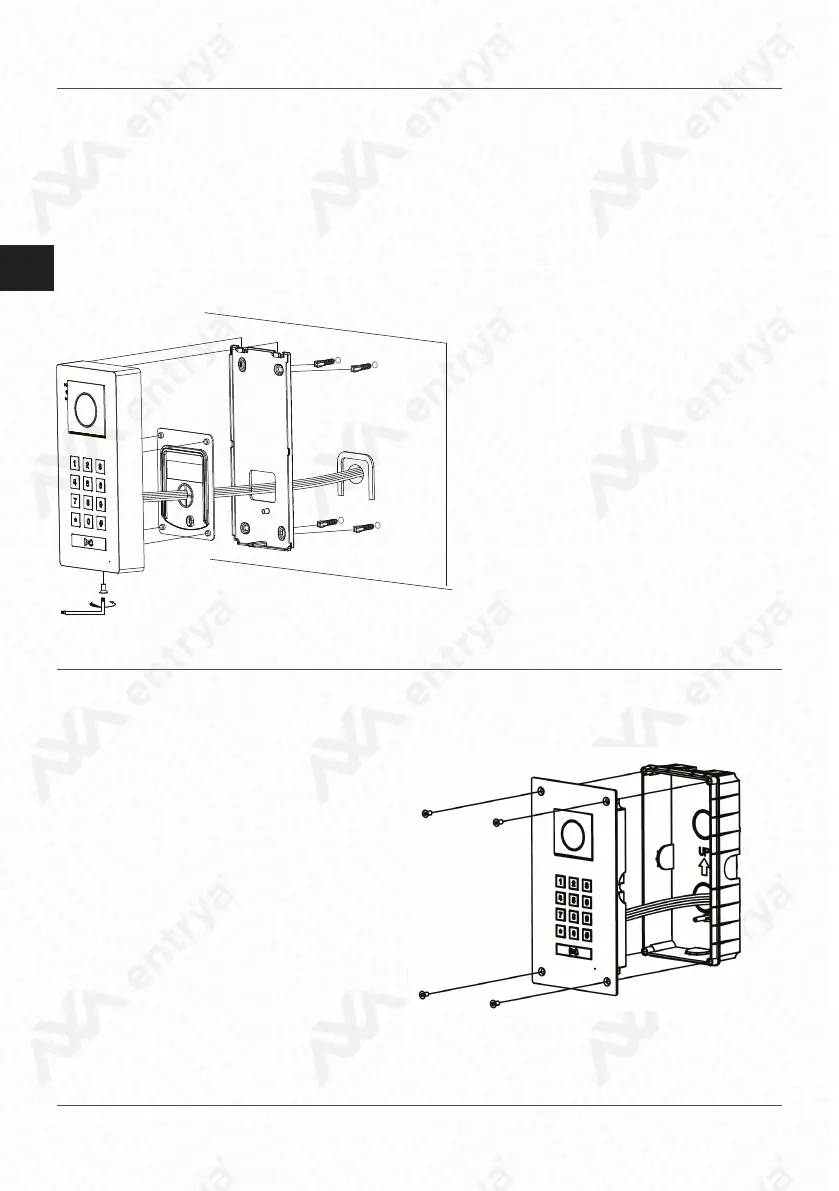
Mount the appliance on a at surface and use the supplied screws or use mounting materials adapted
to the surface. Connect the wiring and select the required settings. Determine the height of the instal-
lation according to the situation.
Important:
• Mount the outpost so that no bright light (e.g. street lighting or sunlight)
• shines directly into the camera lens, otherwise the contrast of the image will be nega-
tive
• aected.
• Protect the device from vibrations and falls.
• Disturbances in the picture or sound may occur if the unit or wiring is mounted too
close to an electromagnetic eld. For example: microwave oven, TV, computer, power
1. Drill holes in the wall and attach the
mounting frame.
2. Connect the wiring and set the correct
settings.
3. Attach the rubber ap.
4. Secure the entrance panel with the
screw at the bottom.
• Make an opening in the wall with the
following dimensions:
104 (W) x 205 (H) x 45 (D)
• Attach the ush-mounted box and run
the cables through the cable gland.
• Attach the outdoor unit to the
ush-mounted box with the supplied
screws.


 To Next Page