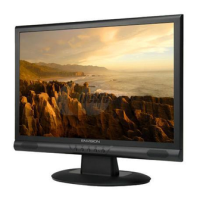
Need help?
Do you have a question about the Envision P2271WL and is the answer not in the manual?
Basic monitor operation and power on/off procedures.
Details the function of each control button on the monitor.
Navigating and using the On-Screen Display menu.
Explains controls like Luminance, Eco mode, Gamma, and DCR.
Adjustments for picture settings like clock, phase, color, and boost.
OSD settings, input selection, auto config, and reset options.
Explains the status and color of the monitor's LED indicators.
Details the pin assignments for analog and DVI connectors.
Lists supported display resolutions and their frequencies.
Describes the physical and general features of the LCD panel.
Technical specifications related to panel display performance.
Electrical properties of the TFT LCD and backlight.
Optical properties like color, contrast, response time, and viewing angle.
Illustrates the functional blocks of the main PCB.
Shows the power adapter's circuitry.
Depicts the converter board's functional blocks.
Detailed electronic circuit diagram of the main board.
Detailed electronic circuit diagram of the adapter board.
Detailed electronic circuit diagram of the converter board.
Circuit diagram and components of the key control board.
Visual representation of the main board's component placement.
Visual representation of the adapter board's component placement.
Visual representation of the converter board's component placement.
Visual representation of the key board's component placement.
Lists necessary tools for service and maintenance.
Troubleshooting steps for when the monitor does not power on.
Troubleshooting steps for no video signal with power LED on.
Troubleshooting steps for display dimness or image anomalies.
Troubleshooting steps for incorrect color display or shifts.

 To Next Page
 General