33
ENVISION CONSOLE INSTALLATION MANUAL
Envision Console Controls
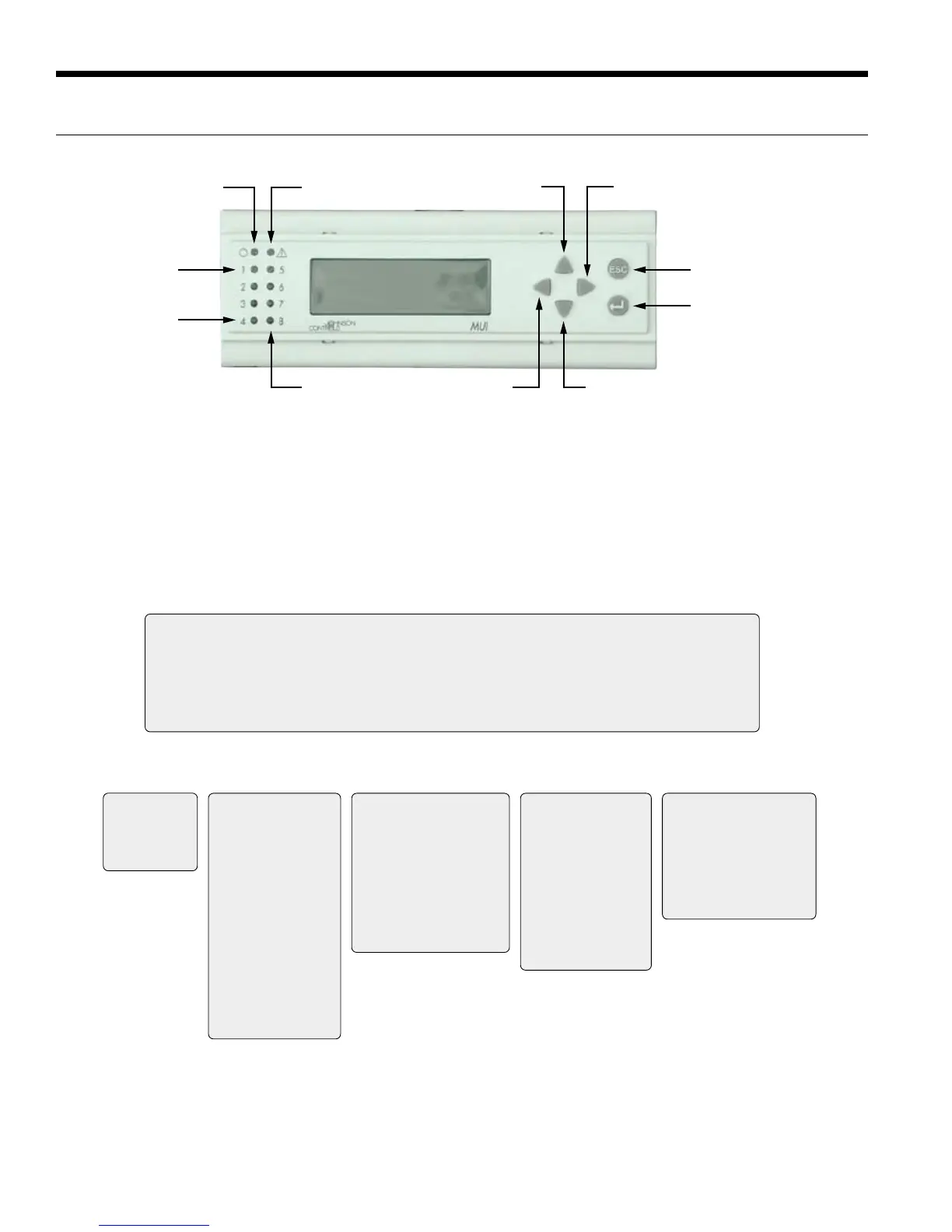
FX10 User Interface (MUI) Physical Layout
Power LED
LED 1
LED 4
Escape (ESC)
Button
Return Button
Alarm LED
LED 8
Up Arrow Right Arrow
Left Arrow Down Arrow
Alarm LED - Indicates a Lock-Out or a bad Freeze Sensor
Power LED - Shows FX processor is operational
LED 1 - Flashing shows Compressor 1 running
LED 2 - Flashing shows Full Capacity Compressor running
LED 3 - On shows Fan running
LED 4 - On shows Reversing Valve in cool
LED 8 - Flashing shows unit in ‘Test’ Mode
MUI Menu Navigation for Single Compressor - Envision Water-to-Air
Welcome
Info Status Temps Outputs Settings Maint Alarms Alm-History
WFI
Envision Series
PROFXENV-XX
3/8/07
Info
Run Mode Auto
Eff Occup’y Occ
Y1 Input OFF
Y2 Input OFF
G Input OFF
O Input OFF
Occ Input Occ
Temp Occ Inp OFF
Condensate NML
Emg Input Run
Lo Press ON
Hi Press ON
Rndm Tmr 0
BI-4 Input OFF
Status
Zone Temp 77.2 ºF
Dis Air Temp 51.0 ºF
Eff Clg Setpt 70.0°F
Eff Htg Setpt 66.0°F
Water Coil 77.8°F
Low WC Limit 30.0°F
Humidity 56.7 %RH
WarmCool AI 14.6
WarmCoolAdj 0.2
Temps
nvoFanStatus ON
CmpCmd Status OFF
Cmp Capacity OFF
Rev Valve Heat
X1 Output OFF
X2 Output OFF
PWMOut 98%
BO5 OFF
BO9 OFF
AO2 Output 0%
Outputs Settings
Unit of Measure F
Occ Clg Setpt 73.9 ºF
Occ Htg Setpt 69.9 ºF
Unocc Clg 84.0 ºF
Unocc Htg 60.0 ºF
DeHumSetpt 0%
SensorSelect TAXXJ02


 To Next Page
 Loading...