Page 5 Envoy Connect User Guide
- Fast Forward: Press and hold to move forward
through the audio file. A beep will sound to indicate
that you are moving forward in 30 second intervals.
Note: The Back and Forward buttons will not operate
when playback is paused.
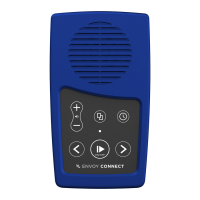
Sleep Timer Button (Upper Right):
When playback is paused:
Press once to select 15 minute sleep timer. Press again
to select 30 minutes. Press a third time to select 60
minutes. Press a fourth time to turn Sleep Timer off. A
chime will sound to provide confirmation of each
selection.
Note: The Sleep Timer button will not operate during
playback.
Other Features:
- Stereo Headphone Jack (Bottom Edge, Left): Plug
headphones or external speaker into the bottom left
3.5mm audio jack. This will mute the Player’s
speaker.
- Micro USB Port (Bottom Edge, Middle)
- Micro SD Card Slot (Bottom Edge, Right)
- Charging: When shipped, the battery may only be
partially charged. Please fully charge the Player
before the first use. To do this, expose the solar


 To Next Page
 Loading...