Page 4 Envoy Connect User Guide
- Power Off: The Player will turn itself off after 2
minutes when playback is paused. When the Player
is paused you can also press and hold for 5 seconds
to turn it off manually. Note that the Player will
remember your last reading position after you press
Play.
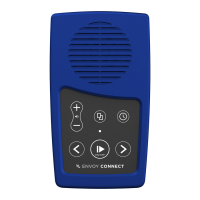
Bookshelf Button (Upper Middle): Press to hear the
title of a book. Press again to choose a different book.
Press Play to begin listening to the chosen book.
Volume Up/Down Buttons (Upper Left): Press the
upper Volume button to increase volume. Press the
lower Volume button to decrease volume.
Back Button (Lower Left):
When playing a book:
- Press to Skip to Previous Heading.
- Rewind: Press and hold to move backwards through
the audio file. A beep will sound to indicate that you
are moving backwards in 30 second intervals.
Forward Button (Lower Right):
When playing a book:
- Press to Skip to Next Heading.


 To Next Page
 Loading...