Page 3 Envoy Connect User Guide
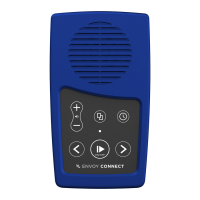
Along the bottom edge of the Player is the headphone
socket on the left. The micro USB port is next to that in
the middle, and the micro SD card slot is on the bottom
right. On the back of the Player is a solar panel and
below that a printed label. A lanyard is attached through
the centre hole on the top.
Definitions:
- Press: means to briefly, but firmly, press the button
down and then release it immediately.
- Press and Hold: means to firmly press the button
down and then continue to hold it for a period (e.g.
press and hold the button for 3 seconds).
Button Descriptions:
Power and Play Button (Lower Middle Position):
- Power On: Press and hold for 3 seconds. Release
the button when you hear the chime. Note that the
Player will announce the current book title each time
it is powered on.
- Play/Pause: Press the same button to start playback.
Press again to pause playback.


 To Next Page