This document provides an instruction manual for the Eono Single Monitor Counterbalance Desk Mount PL03. It covers assembly steps, technical specifications, usage features, and important safety and maintenance information in multiple languages, including English, German, French, Italian, and Spanish.
Function Description:
The Eono Single Monitor Counterbalance Desk Mount PL03 is designed to securely hold a single monitor on a desktop, offering flexibility in positioning and viewing angles. It utilizes a gas spring arm to allow for smooth and effortless adjustment of the monitor's height, tilt, swivel, and rotation. The mount can be installed using either a clamp mechanism or a grommet base, accommodating various desktop setups. Its primary function is to enhance ergonomic comfort and optimize desk space by elevating the monitor and providing a wide range of adjustability. The counterbalance feature ensures that the monitor remains stable at the desired height, preventing it from falling or rising unexpectedly. Cable management features are integrated to keep the workspace tidy and organized.
Important Technical Specifications:
- Model: PL03
- VESA Compatibility: 75x75mm, 100x100mm
- Screen Size Compatibility: Up to 32 inches
- Weight Capacity: 2-8 kg (4.4-17.6 lbs)
- Height Adjustment Range (Clamp Installation): 10-60mm (desktop thickness)
- Height Adjustment Range (Grommet Base Installation): 10-90mm (desktop thickness)
- Tilt Angle: +90° to -45°
- Swivel Angle: 180° (at the arm joint), 360° (at the VESA plate and base)
- Rotation: 360° (for portrait or landscape orientation)
- Materials: Not explicitly stated, but implied to be metal for structural components and plastic for covers.
- Dimensions (Unit: mm):
- Overall height range: 170-410mm
- Arm length (from base to VESA plate): 184-260mm
- Base width: 100mm
- Clamp/Grommet base thickness range: 10-80mm
- VESA plate dimensions: 75x75mm, 100x100mm, 115x115mm (outer dimensions)
- Distance from VESA plate to arm joint: 250mm
Usage Features:
- Dual Installation Options: The mount offers two methods for attachment to a desktop:
- Clamp Installation (Option A): Suitable for desks with edges, allowing the mount to be secured by tightening a clamp. This method supports desktop thicknesses from 10mm to 60mm.
- Grommet Base Installation (Option B): Ideal for desks with existing grommet holes, where a carriage bolt passes through the hole and is secured from underneath. This method supports desktop thicknesses from 10mm to 90mm.
- Monitor Attachment:
- Flat Back Monitors (Option A): The VESA plate (B) attaches directly to the monitor's back using M4x12 (M-A) or M6x12 (M-B) screws and D6 washers (M-C). A 6mm Allen key (M) is used for tightening. Users are advised to avoid overtightening to prevent damage.
- Curved Back Monitors (Option B): Similar to flat back monitors, but includes spacers (M-D) in addition to screws and washers to accommodate the curvature of the monitor's back.
- Easy Monitor Hanging: After attaching the VESA plate to the monitor, the monitor slides onto the head of the swivel arm. A security bolt (I) is then installed to ensure the monitor is securely in place before rotation.
- Adjustable Tilting Angle: The monitor's tilting angle can be adjusted by fastening or loosening a tilting bolt, allowing for precise positioning to reduce glare and improve viewing comfort. The tilt range is +90° to -45°.
- Gas Spring Tension Adjustment: The gas spring arm's tension can be adjusted using a 5mm Allen key (L) to match the monitor's weight.
- If the monitor falls down, turn counter-clockwise ("+") to increase tension.
- If the monitor rises up, turn clockwise ("-") to reduce tension.
- It is crucial to keep the arm in a horizontal position during adjustment for ease and to prevent damage.
- Cable Management: The mount features removable plastic covers on the gas spring arm (A) to route cables, keeping them organized and out of sight for a cleaner workspace.
- Full Range of Motion: The mount allows for extensive adjustments including 360° rotation for portrait or landscape orientation, 180° swivel at the arm joint, and 360° swivel at the base, providing maximum flexibility for monitor positioning.
Maintenance Features:
- Regular Security Checks: Users are advised to check that the bracket is secure and safe to use at regular intervals, specifically at least every three months. This ensures ongoing stability and prevents potential accidents.
- Contact Customer Service: If there are any questions, doubts about safety, installation, assembly, or use of the product, customers are encouraged to contact customercare@hingear.com. This provides a direct channel for support and troubleshooting.
- Weight Capacity Adherence: Strict adherence to the specified weight capacity (2-8 kg / 4.4-17.6 lbs) is a critical maintenance aspect. Exceeding this limit can lead to product failure and potential injury.
- Proper Screw Tightening: During assembly and monitor attachment, users are cautioned against excessive tightening of screws, which can damage the monitor or the mount. This highlights the importance of careful and appropriate force during installation.
- Safe Monitor Removal: When removing the monitor, it is essential to keep the front arm at its highest position. Failure to do so could cause the arm to spring up unexpectedly, posing a risk of injury.
- Indoor Use Only: The product is designed exclusively for indoor use. Using it outdoors can lead to product failure and personal injury, emphasizing a key maintenance and safety guideline.
- Small Parts Warning: The manual explicitly states that the product contains small items that could be a choking hazard, especially for children under 3 years old. Adult supervision is required, which is a crucial safety and maintenance note for households with young children.

 Need help?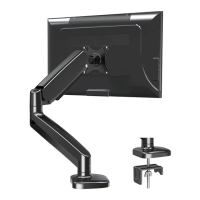

 To Next Page
 General