5
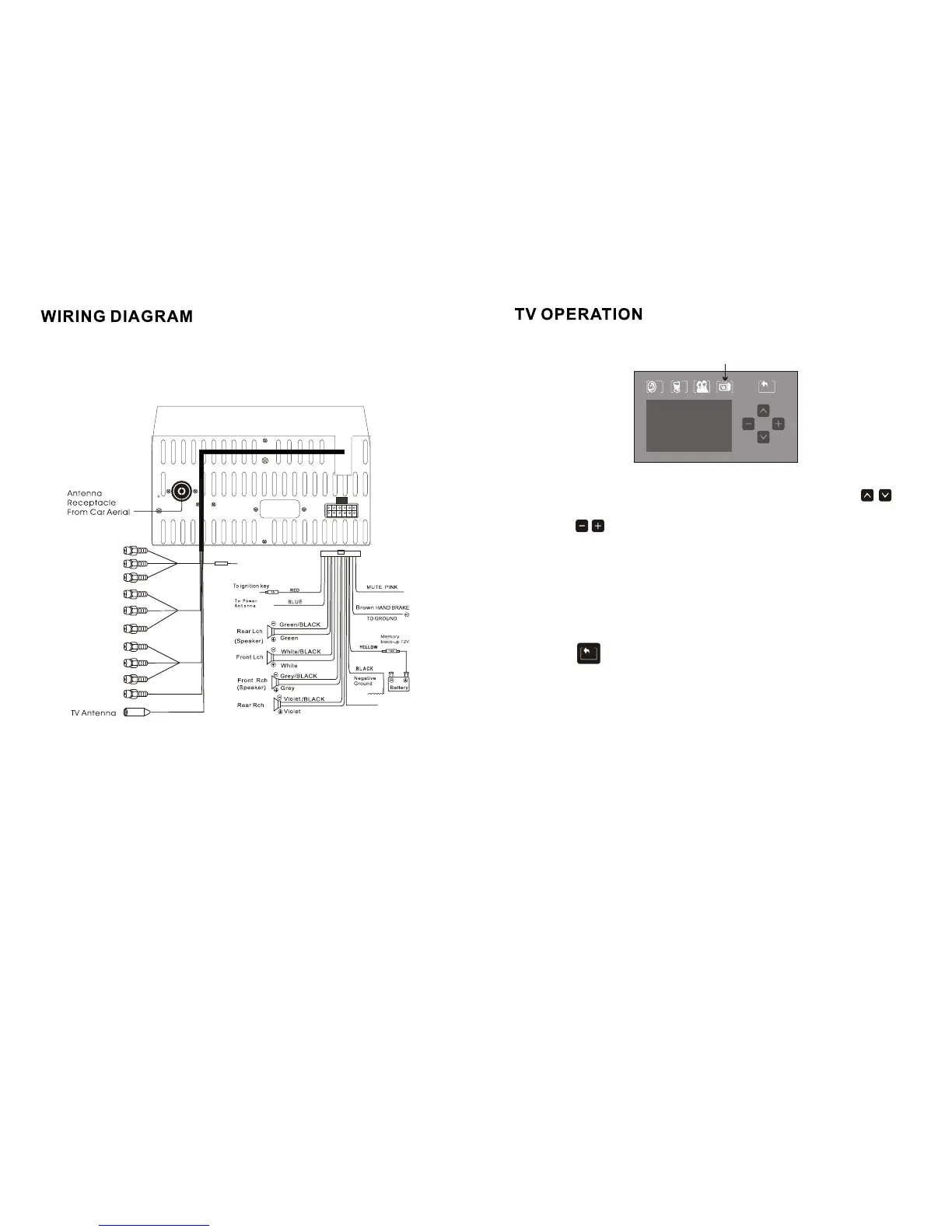
Wiring Diagram
10
Press the up/ down buttons on the remote control or touch the
icons on the touch screen panel to select the item needed to adjust.
Touch the icons to adjust the volume of the parameter of the
selected item and press ENTER to confirm.
FORMAT: to adjust the TV system. The default system is PAL I.
PRESET: to store the searched TV stations
MANUAL: to search the TV stations manually. The system can search and
store the TV stations automatically.
SKIP: to open or close the TV stations searching function.
Touch the icon to go back to the previous menu.
BACKBACKBACK
AUDIOAUDIOAUDIO
PICPICPIC
USERUSERUSER
BACKBACKBACK
TV SETUPTV SETUPTV SETUP
FORMAT
PRESET
MANUAL
AUTO SEARCH
SKIP
PAL I
008
SCAN
OFF
49.75MHZ
ORANGE
BACK UP CAR SINGAL(+12V)
GPS VIDEO
(YELLOW)
LINE(L) IN
AV IN
(YELLOW)
RED(R) IN
WHITE(L) IN
RED(R) OUT
WHITE(L) OUT
VIDEO OUT
(YELLOW)
GPS CONTROL
(ORANGE)
LINE(R) IN
BLUETOOTH
Antenna



 To Next Page