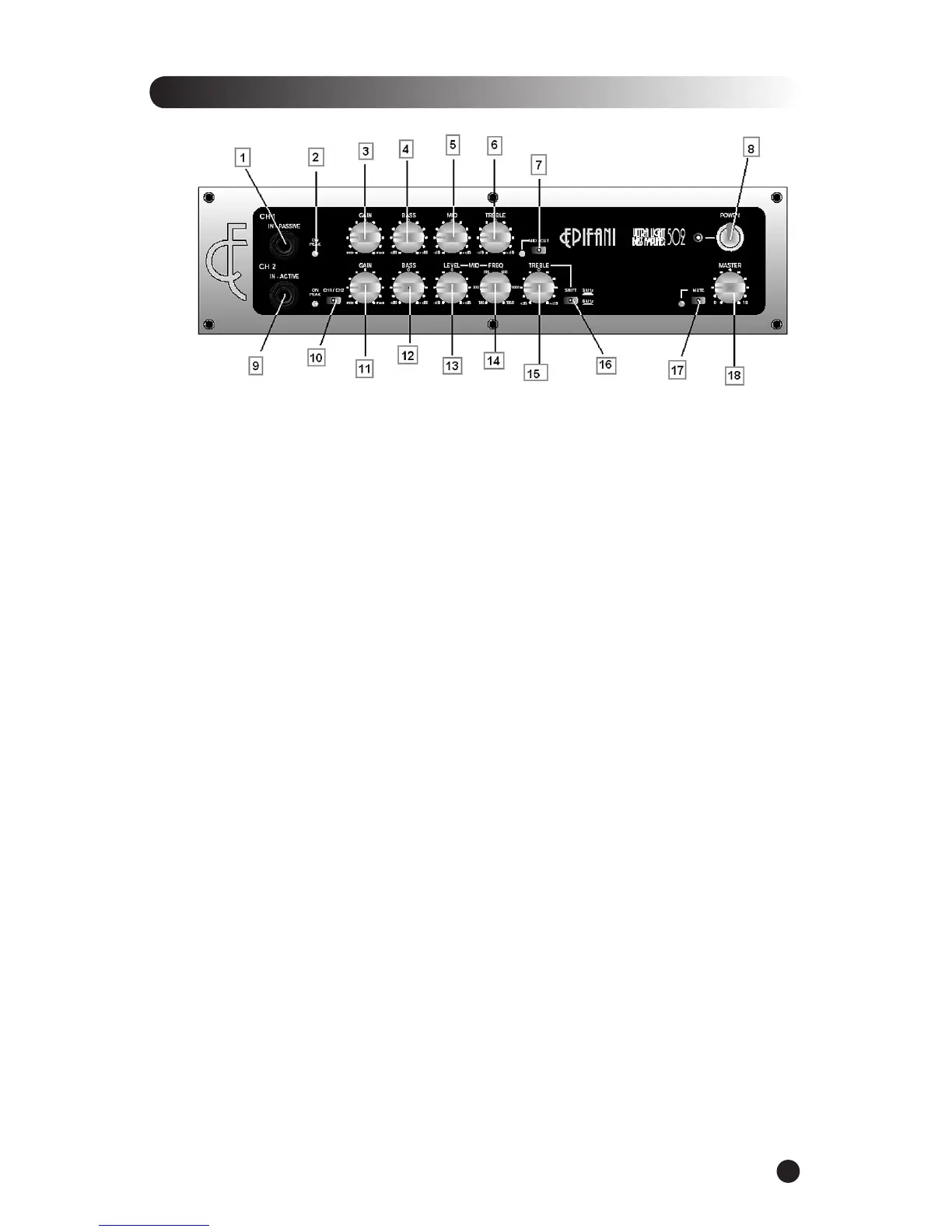
Input jack for a passive instrument.
LED Channel Indicator & Peak Indicator –
Indicates channel switching and gain limits.
Adjusts the input signal to the appropriate level.
Adjust the amount of low frequency
Channel 1 Mid- Midrange Control –
Adjusts the amount of midrange frequencies
Channel 1 Treble Control –
Adjusts the amount of high frequencies
Channel 1 Mid-cut switch/w led –
Eliminates speci c midrange frequencies
Turns the Ampli er on or off.
Input jack for an instrument with Active electronics.
Switches between Channel 1 and Channel 2 (engaged either manually or via
Adjusts the input signal to the appropriate level.
Adjust the level accordingly to your preference. Start at the twelve o’clock position and
add/ deduct, as you prefer.
Channel 2 Parametric Midrange Level Control –
This feature allows you to boost or cut a
particular frequency chosen by the Mid-Frequency Control (14). * When the Level Control is set
at 12 o’clock it is at “0” (it is neither boosting nor cutting any frequencies), therefore you will
hear no difference when adjusting the Mid Frequency Control (14).
Channel 2 Parametric Mid Frequency Control –
This control allows you to select a center point
frequency between 180 & 2000 HZ. – That bandwidth can be boosted or cut via the Mid Level
Channel 2 Treble Control –
Adjusts the amount of high frequencies
Channel 2 Treble Shift Selector –
This feature “shifts” the treble frequency from 3 kHz to 6 kHz
Is engaged manually or via the optional footswitch. The Mute switch
mutes the ampli er section but not the pre-amp section.
Adjusts the overall output of the ampli er.


 To Next Page