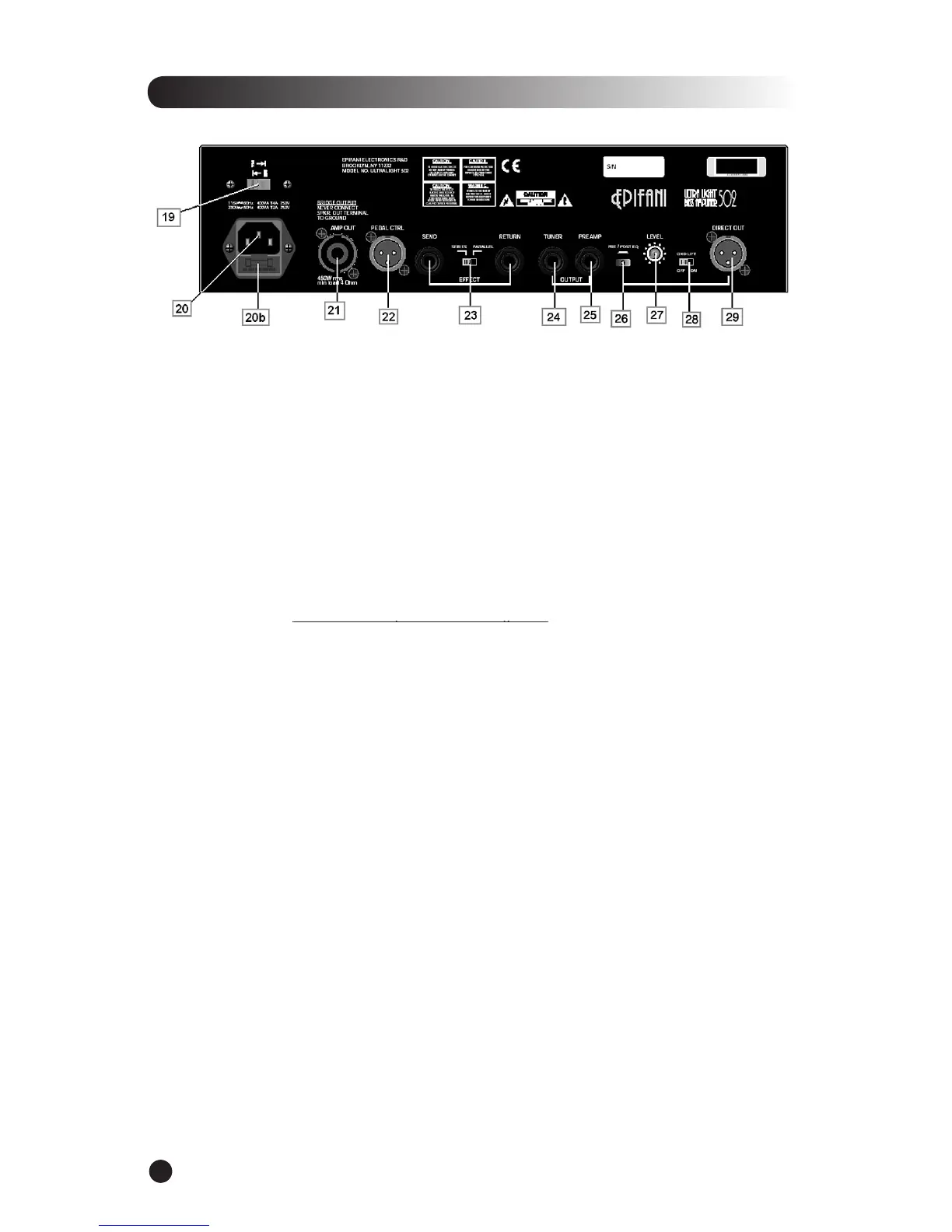
*Balanced Out- (Quest II preamp only) - This XLR jack is a low noise output intended for use with an
ampli er that has a balanced input.
USA/European Power Select Switch –
Select 120V for use in the U.S. Select 220V for European
Firmly plug the supplied AC power cable into the socket.
The fuse protects the ampli er from damage due to line current faults, power surges
etc... If the fuse blows replace it with the appropriate fuse. For 120V units replace with a 6.3A
250 Volt fuse, on 220 V units replace with a 3.15A 250V fuse.
Amp Out with Speakon™ Connector –
Connect your ampli er to the speaker cabinet using a
NEVER connect plus or minus to ground
NEVER connect plus or minus to ground
– (i.e. we highly recommend the use
of a “Speakon to Speakon” for a better connection. In the event of a Speakon to inch
connection be sure the connection from the amp to cabinet is made while the ampli er is OFF.
Allows you switch between Channel 1 and Channel 2 and toggle Mute/Tuner,
This feature allows you to use outboard effects with the Ultra Light Amp.
Effects Send/Return - Can also be run in series or parallel via the selector switch (23).
Connect your tuner using an instrument cable. While in mute mode you can
Use this feature to bypass the power section of your Ultra Light 502/902 and use
an alternate power amp. If you are using a Quest II preamp, connect your power amp input here
using an instrument cable.
Selects whether direct output (DI) signal comes before or after Ultra Light
Adjusts the signal coming from Direct Out (Usually kept at the twelve o’clock
position). Adjust accordingly in conjunction with different applications (recording, live, etc.).
Disconnects chassis ground to get rid of unwanted hiss and buzzing.
Send a balanced signal to house sound or sound engineer (Can be also used
as a “record out” for studio applications).


 To Next Page