EasyManua.ls Logo

Epomaker Brick 87 - Advanced Function Key Combinations; Keyboard Reset and Mode Switching; Bluetooth Device Pairing; 2.4 G Wireless Pairing

Epomaker Brick 87
7 pages
Print Icon
To Next Page IconTo Next Page
To Previous Page IconTo Previous Page
Loading...
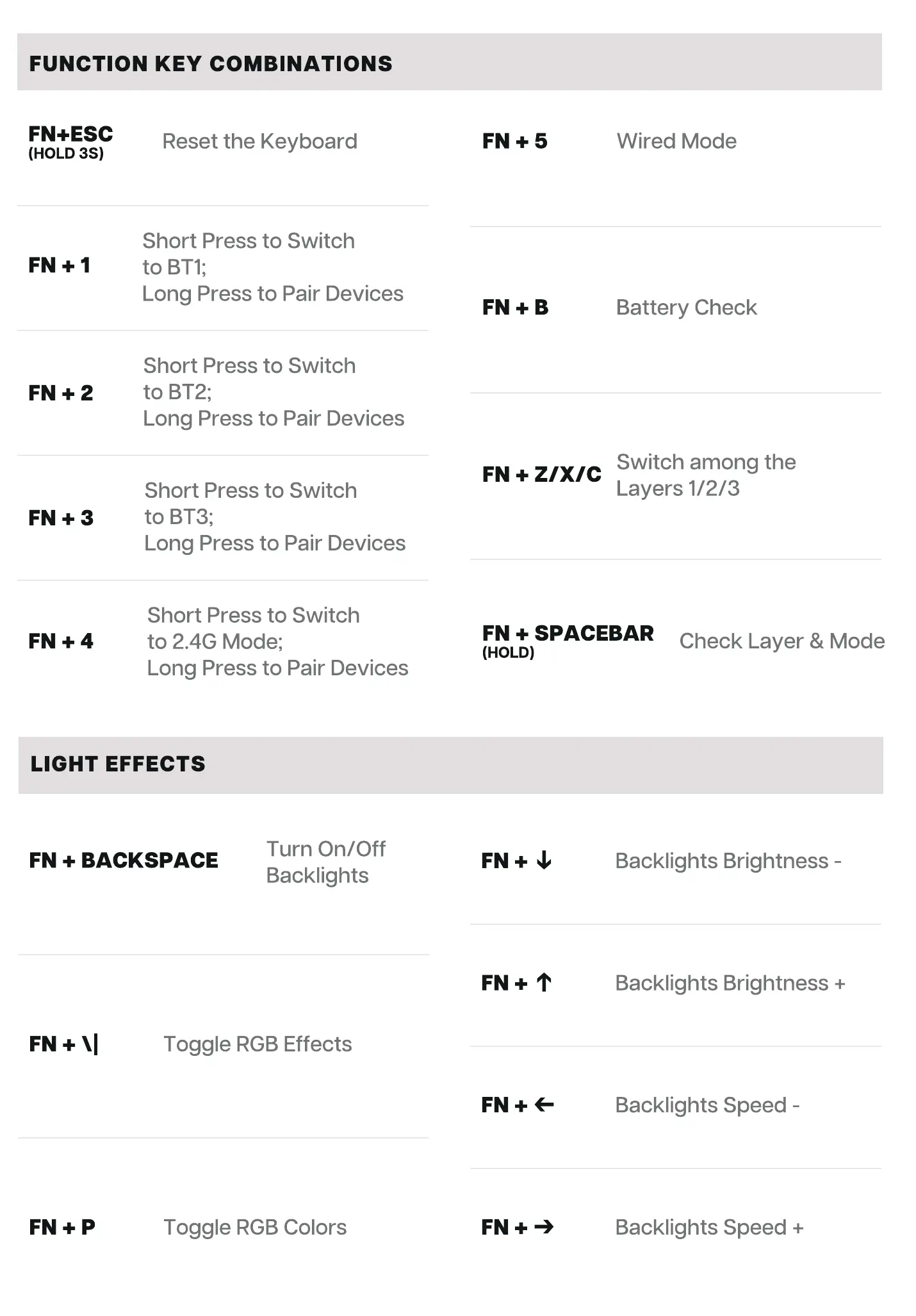
FUNCTION KEY COMBINATIONS
FN+ESC
(HOLD 3S)
FN+2
Reset the Keyboard
Short Press to Switch
to BTI•,
Long Press to Pair Devices
Short Press to Switch
to BT2;
Long Press to Pair Devices
Short Press to Switch
to BT3•,
Long Press to Pair Devices
Short Press to Switch
to 2.4G Mode;
Long Press to Pair Devices
Wired Mode
Battery Check
Switch among the
FN + Z/X/C
Layers 1/2/3
FN + SPACEBAR
(HOLD)
Check Layer & Mode
LIGHT EFFECTS
Turn On/Off
FN + BACKSPACE
Backlights
Toggle RGB Effects
Toggle RGB Colors
Backlights Brightness -
Backlights Brightness +
Backlights Speed -
Backlights Speed +

Related product manuals