Installation
Page 3-12
J3
J2
""
""
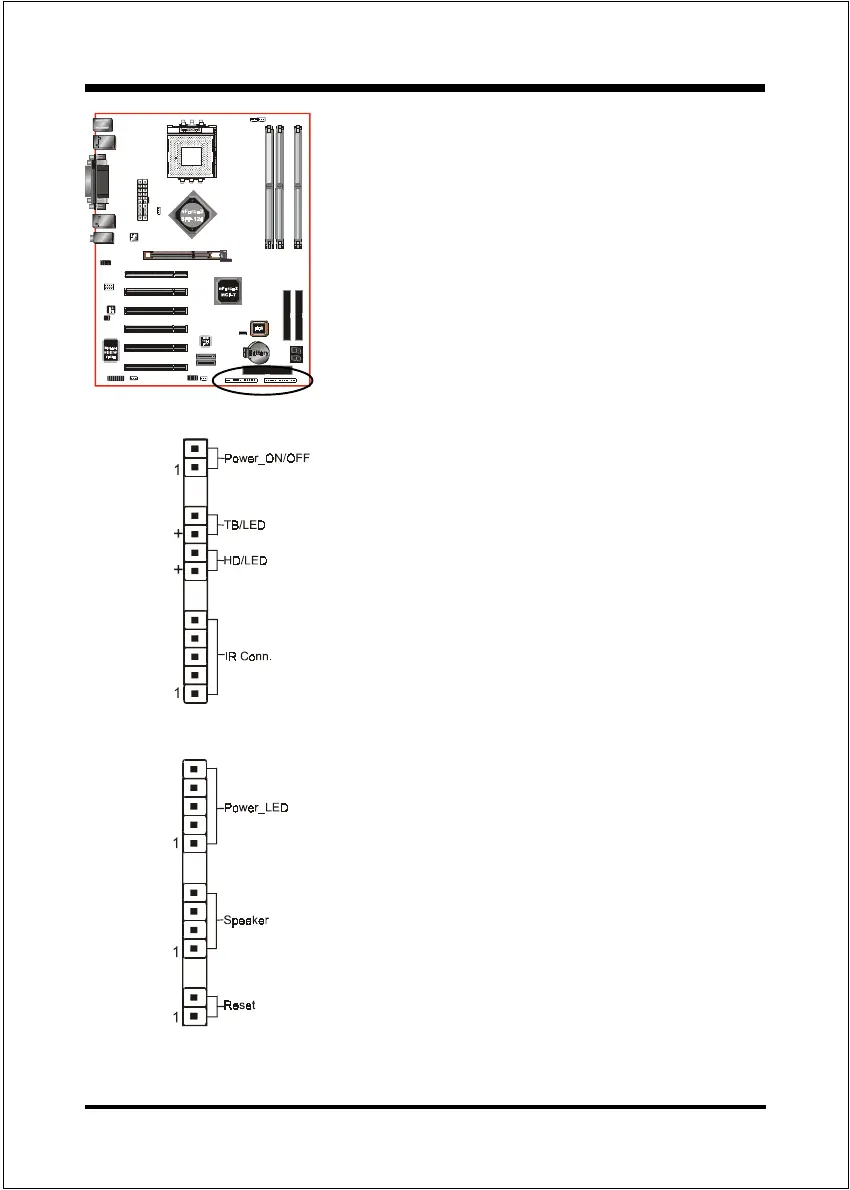
" Power On/Off
This is connected to the power button on the
case. Using the Soft-Off by Pwr-BTTN
feature, you can choose either Instant Off
(turns system off immediately), or 4 sec delay
(push the button for 4 seconds before the
system turns off). When the system is in 4
sec delay mode, suspend mode is enabled by
pushing the button momentarily.
""
""
" Turbo LED indicator
""
""
" IDE LED indicator
LED on when onboard PCI IDE Hard disks are
being accessed.
""
""
" IR Connector
1. VCC 4. GND
2. CIRRX 5. IRTX
3. IRRX
""
""
" Power LED
Power LED connector
1. VCC 4. NC
2. N/C 5. GND
3. VCC
""
""
" Speaker
Connect to the systems speaker for beeping
1. Speaker 3. GND
2. N/C 4. VCC
""
""
" Reset
Closed to restart system.


 To Next Page