34
R4C479
short.bk Rev_C
A5 size SOFTM.FM
2/15/00 Pass 2
L
Proof Sign-off:
M.Otsuka _______
N.Nomoto _______
editor name _______
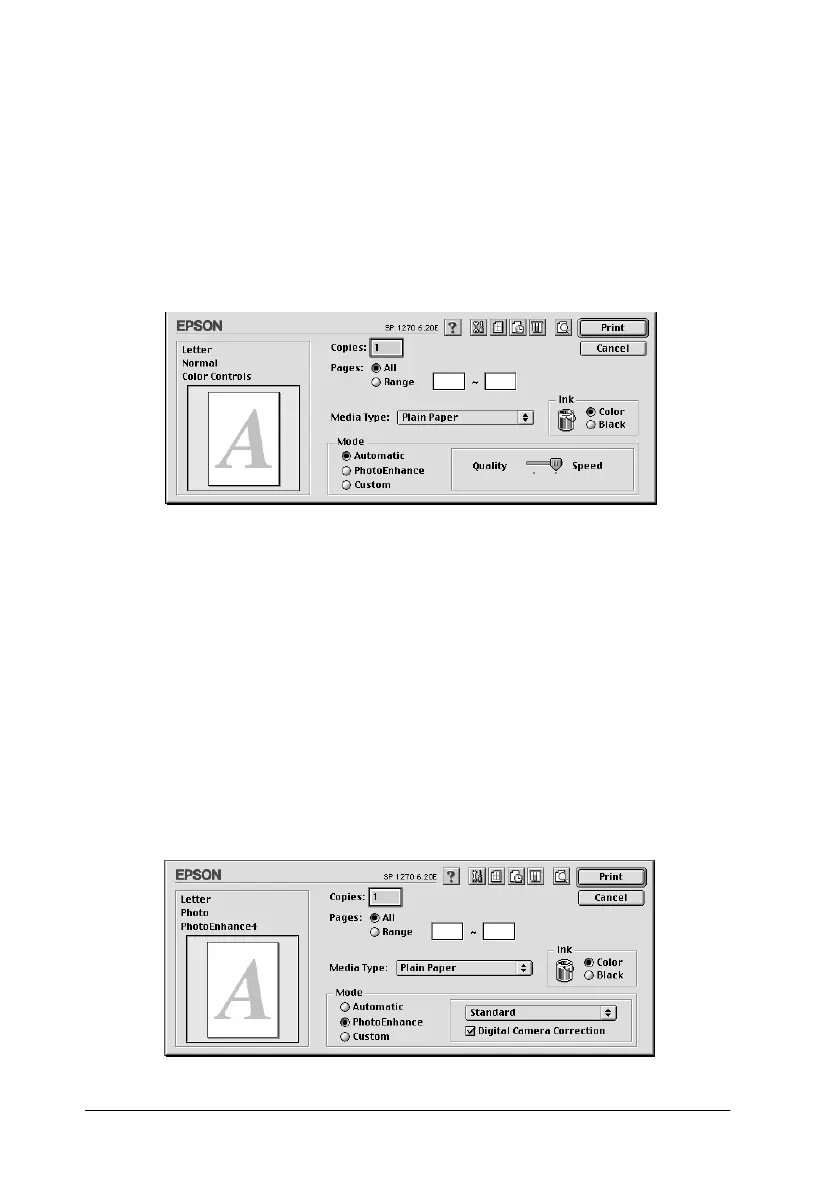
Using the Automatic mode
When Automatic
is selected as the Mode setting in the Print dialog
box, the printer driver takes care of all detailed settings based on
the current Media Type and Ink settings. To make the Ink setting,
click
Color
to print in color, or
Black
to print in black-and-white
or grayscale. To make the Media Type setting, see “Making the
Media Type setting” on page 29.
Note:
Depending on the media you choose in the Media Type list (while
Automatic
is selected), a slider appears to the right of the Mode options
that lets you choose
Quality,
Speed
or an intermediate setting. Select
Quality
when print quality is more important than speed.
Using the PhotoEnhance mode
The Photo Enhance mode provides a variety of image-correction
settings that you can apply to your photo images before printing.
PhotoEnhance does not affect your original data.



 To Next Page