27
EASY MENU
EASY MENU (continued)
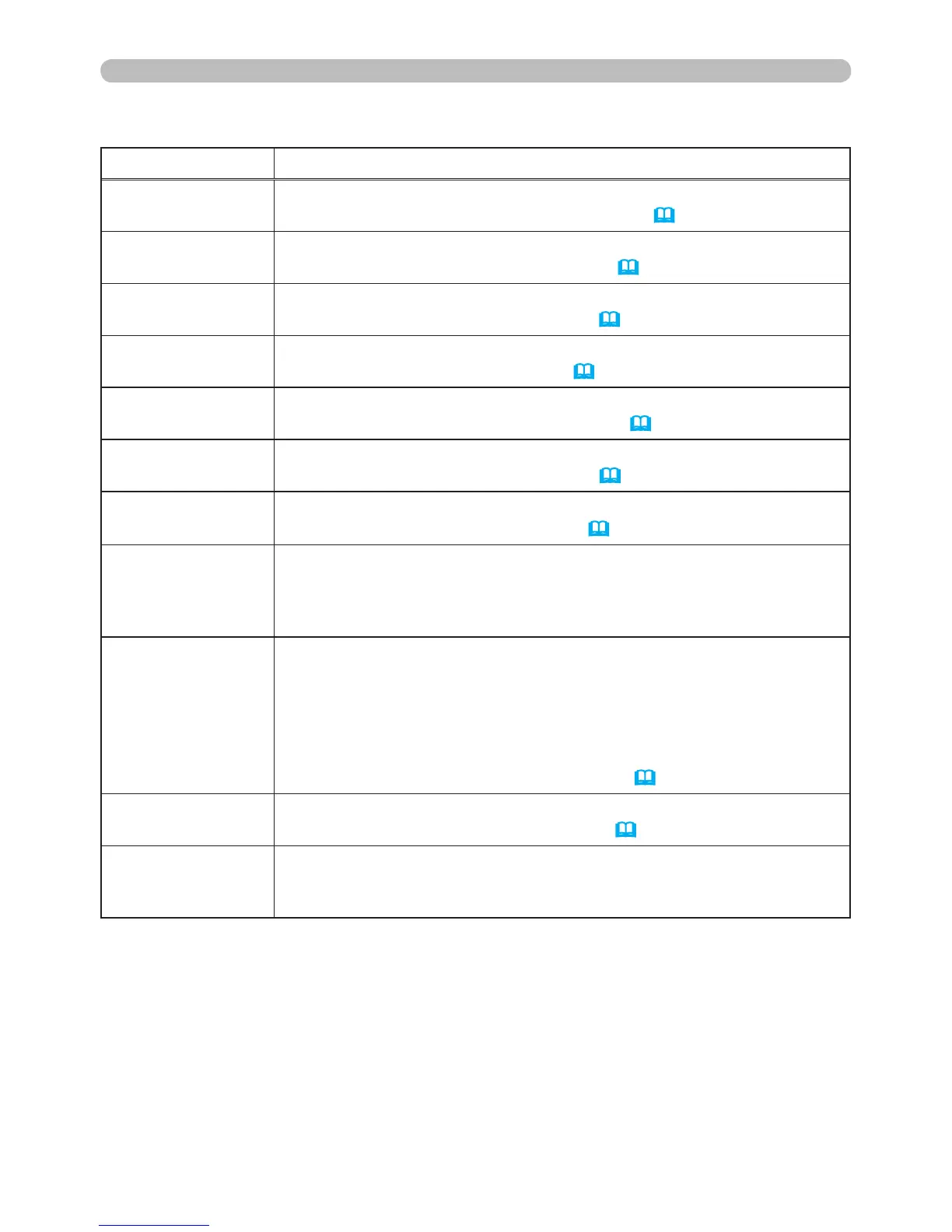
Item Description
BRIGHTNESS
Using the ◄/► buttons adjusts the brightness.
See BRIGHTNESS item in PICTURE Menu
(
28).
CONTRAST
Using the ◄/► buttons adjusts the contrast.
See CONTRAST item in PICTURE Menu
(
28).
COLOR
Using the ◄/► buttons adjusts the strength of whole color.
See COLOR item in PICTURE Menu
(
29).
TINT
Using the ◄/► buttons adjusts the tint.
See TINT item in PICTURE Menu
(
29).
SHARPNESS
Using the ◄/► buttons adjusts the sharpness.
See SHARPNESS item in PICTURE Menu
(
30).
WHISPER
Using the ◄/► buttons turns off/on the whisper mode.
See WHISPER item in SETUP Menu
(
36).
MIRROR
Using the ◄/► buttons switches the mode for mirror status.
See MIRROR item in SETUP Menu
(
36).
RESET
Performing this item resets all of EASY MENU items except FILTER
TIME and LANGUAGE.
Pressing the RESET button or the ► button displays a dialog. To
reset, select RESET using the ▲ button performs resetting.
FILTER TIME
The usage time of the air-lter is shown in the menu.
Performing this item resets the lter time which counts usage time
of the air-lter.
Pressing the RESET button or the ► button displays a dialog. To
reset the lter time, select RESET using the ▲ button performs
resetting.
See FILTER TIME item in OPTION Menu
(
43).
LANGUAGE
Using the ◄/► buttons changes the display language.
See LANGUAGE item in SCREEN Menu
(
38).
Go to
Advanced Menu...
Select Go to Advanced Menu… on the menu, and press the
►
or ENTER button to use the menu of PICTURE, IMAGE, INPUT,
SETUP, SCREEN, OPTION, NETWORK or C.C..


 To Next Page