
 Need help?
Do you have a question about the Epson ELPAP12 and is the answer not in the manual?
Indicates information that, if ignored, could result in personal injury or death.
Indicates information that, if ignored, could result in personal injury or physical damage.
Turns the Android TV device on or off.
Arrow, Enter, and Back buttons for menu navigation and selection.
Controls volume and provides quick access to YouTube, Netflix, and Google Play.
Activates voice control and displays the Android TV home screen.
Displays a list of applications available on the Android TV.
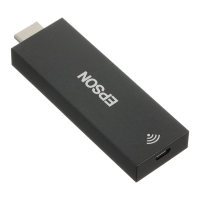
Connect the Android TV device to an HDMI extension cable.
Connect the HDMI extension cable to the projector's HDMI port.
Connect the USB power cable to the dedicated power supply port and the Android TV port.
Connect the Android TV device to an HDMI extension cable.
Connect the HDMI extension cable to the projector's HDMI port.
Connect the USB power cable to the Android TV device.
Connect the AC adapter to an electrical outlet.
Connect the USB power cable to the AC adapter.
Turn on the projector and wait for the pairing screen if necessary.
Hold Enter and Volume down buttons on the remote for three seconds.
Choose the desired language for the screen display.
Select your Wi-Fi network and follow on-screen instructions.
Sign in to your Google Account to access apps and services.
Check battery installation and pairing status for remote control problems.
Verify router functionality and minimize obstacles for stable Wi-Fi.
Lists product name, dimensions, mass, image output, power supply, and Wi-Fi standards.
Details the recommended operating and storage temperature and humidity ranges.
 General
| Brand | Epson |
|---|---|
| Model | ELPAP12 |
| Category | TV Receiver |
| Language | English |

 To Next Page