10
11
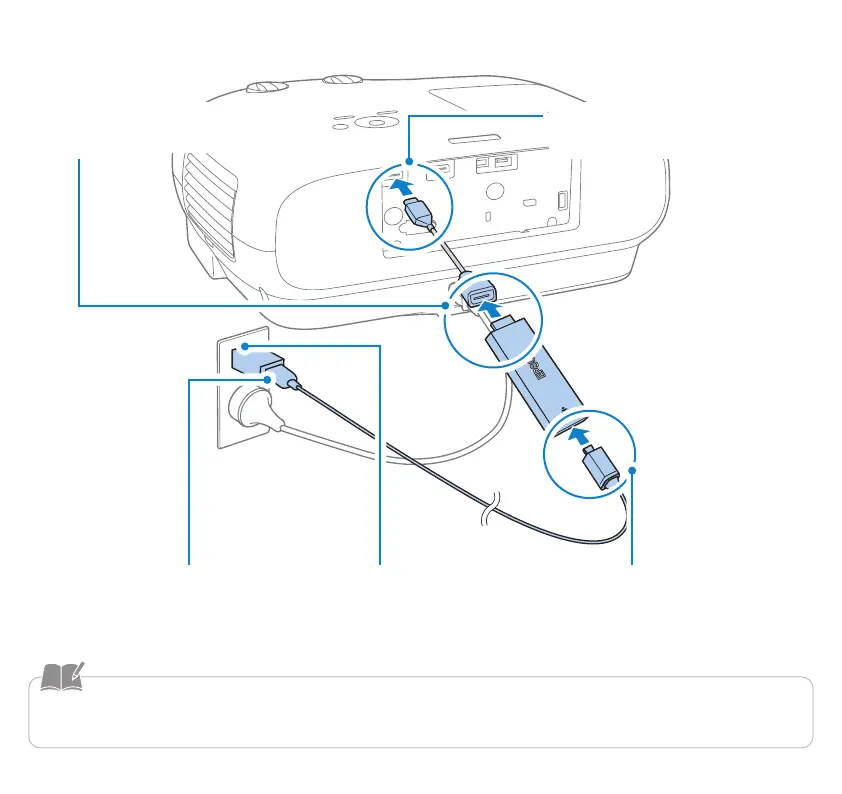
If the projector does not have a USB port capable of supplying 2.0 A of power
A
Connect your Android TV device to
an HDMI extension cable
B
Connect the HDMI extension
cable to the HDMI port
C
Connect the USB power cable
to the Android TV device
D
Connect the AC adapter to an
electrical outlet
E
Connect the USB power
cable to the AC adapter
• AC adapter is sold separately. When connecting to an electrical outlet, prepare an AC adapter with a DC 5V/2A output.
• Do not bend the cable with too much force, as this may cause it to disconnect.


 To Next Page