32
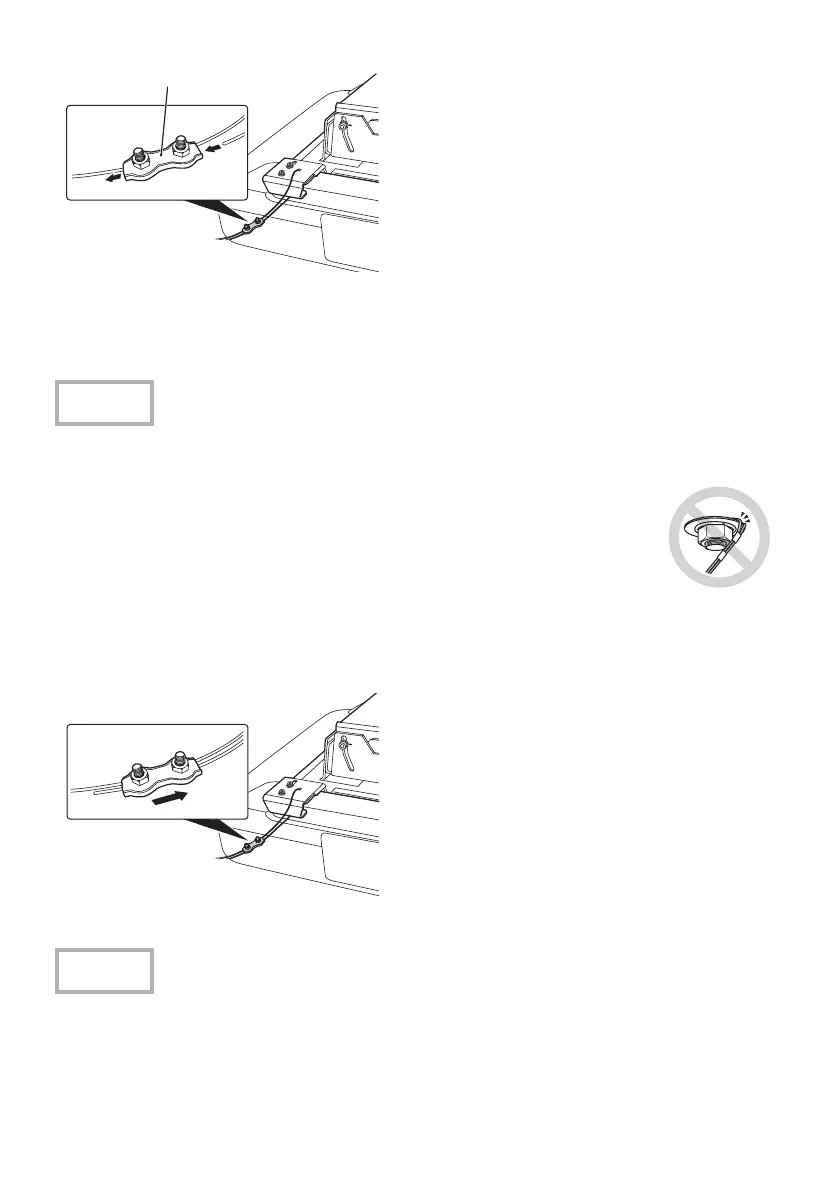
C Loosen the screws of the wire clip, and
then pass the end of the safety wire
through the wire clip and a hole on a
hook of the projector plate.
D Pull the end of the wire rope out from
under the handle and pass it through the
wire clip.
E Stretch the safety wire as tight as
possible without causing the position of
the projected image to move, and then
tighten the screws of the wire clip
loosely to secure the wire.
After installing the safety wire, check the followings. If by any chance the wire is damaged,
replace it with a commercially available wire rope of 1.5 mm or more in diameter.
vThe wire is not frayed or unraveling.
vThe wire is not bent at an acute angle against the edge of the flat washer
or other object.
F Perform steps 3 to 5 again for other
safety wires and fix them to the projector
as well.
G After installing the safety wires, move all
the wire clips in the direction shown in
the illustration and tighten the screws of
the clips.
vIf the supplied safety wires are too short for where you are installing the projector, use
commercially available wire ropes of 1.5 mm or more in diameter.
vCut off any extra wire rope after installation.
Caution
Caution
Wire clip


 To Next Page