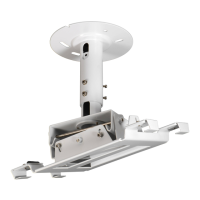
Need help?
Do you have a question about the Epson ELPMB30 and is the answer not in the manual?
Attaching the primary ceiling mounting plates A and B to the ceiling structure.
Connecting ceiling plate C to ceiling plate B for projector angle adjustment.
Attaching the projector mounting plate securely to the projector body.
Connecting the projector assembly to the ceiling mount structure.
Attaching the cover for the ceiling mount assembly after installation.
Using the projector's lens shift function to adjust image position.
Adjusting the projector's vertical position to shift the projected image up or down.
Adjusting the projector's horizontal position to shift the projected image left or right.
Correcting the horizontal tilt or 'roll' of the projected image.
 General
| Compatibility | Epson projectors |
|---|---|
| Compatible Projector Series | PowerLite |
| Mount Type | Ceiling Mount |
| Material | Steel |
| Color | White |
| Product Type | Ceiling Mount |
| Weight Capacity | 15 kg |

 To Next Page