Proof Sign-o:
A. Yoshizawa CRM S. Tanaka
M. Ishigami
editor
R41AG1090
Start Here Rev.C_Final
R41AG1090_SH-EN_TH_VI_MS.indd A3 size
2016/06/10
4132811-00 Black
Front
Basic Operations /
/
Các Thao các Cơ bản / Operasi Asas
Guide to Control Panel / /
Hướng dẫn về Bảng Điều khiển / Panduan kepada
Panel Kawalan
Loading Paper /
/
Nạp giấy / Mengisi Kertas
A
Open and slide out.
Mở và trượt ra.
Buka dan tarik keluar.
C
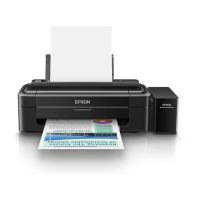
Load paper with the printable side face-up.
Nạp giấy có mặt in ngửa lên.
Isi kertas dengan muka boleh cetak menghadap ke atas.
D
Slide the edge guide against the paper, then close the feeder guard.
Trượt thước canh vào lề giấy, và sau đó đóng tấm bảo vệ khay nạp.
Tarik pandu tepi kepada kertas, kemudian tutup pengadang penyuap.
E
Copying /
/
Sao chụp / Menyalin
A
Q
Do not load paper above H mark inside the edge guide.
H
Không nạp giấy vượt quá dấu H bên trong thước canh.
Jangan isikan kertas di atas tanda H di dalam panduan tepi.
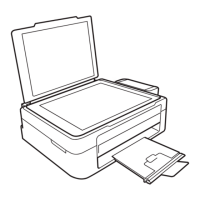
Open the document cover and place your original face-down on the scanner
glass. Align the original with the front right corner of the glass.
Mở nắp che tài liệu và đặt bản gốc úp mặt xuống mặt kính máy quét. Canh
chỉnh bản gốc theo góc phải phía trước của kính.
Buka penutup dokumen dan letakkan dokumen asal anda menghadap ke
bawah pada kaca pengimbas. Sejajarkan dokumen asal dengan sudut depan
kanan pada kaca.
B
Close the document cover.
Đóng nắp tài liệu.
Tutup penutup dokumen.
B
Slide the edge guide to the left.
Trượt thước canh về phía trái.
Tarik pandu tepi ke kiri.
Slide out.
Trượt ra.
Tarik keluar.
c
Make sure to hook the tank unit before printing. Do not lay the unit
down, or position it higher or lower than the printer.
Hãy chắc chắn móc hộp mực trước khi in. Không để hộp nằm
xuống, hoặc đặt ở vị trí cao hơn hoặc thấp hơn máy in.
Pastikan supaya unit tangki dicangkuk sebelum mencetak. Jangan
baringkan unit tersebut atau meletaknya lebih tinggi atau lebih
rendah daripada pencetak.
C
Press the or button to start copying.
Bấm nút
hoặc để bắt đầu sao chụp.
Tekan butang
atau untuk mula
menyalin.
Q
O You can make up to 20 copies by pressing the or button
the same number of times as the number of copies you want to
make.
O Press the y and the
or buttons simultaneously to copy
in draft mode.
O
O y
O Bạn có thể thực hiện sao chụp tới 20 lần bằng cách bấm nút
hoặc nhiều lần bằng với số lượng bản sao bạn muốn
thực hiện.
O Bấm các nút y và
hoặc đồng thời để sao chụp ở chế độ
bản thảo.
O Anda boleh membuat sehingga 20 salinan dengan menekan
butang
atau beberapa kali mengikut jumlah bilangan
salinan yang ingin dibuat.
O Tekan butang y dan
atau serentak untuk menyalin
dalam mod draf.
Epson Connect
Using your mobile device, you can print from any location worldwide to your
Epson Connect compatible printer. Visit the website for more information.
Khi sử dụng thiết bị di động bạn có thể in từ bất cứ vị trí nào trên toàn cầu tới
máy in Epson Connect tương thích. Hãy truy cập trang web để biết thêm thông
tin.
Menggunakan peranti mudah alih, anda boleh mencetak dengan pencetak
serasi Epson Connect anda dari mana-mana lokasi di seluruh dunia. Kunjungi
laman web untuk mendapatkan maklumat lanjut.
https://www.epsonconnect.com/
Turns the printer on or o.
Bật hoặc tắt máy in.
Menghidupkan atau mematikan pencetak.
Clears a network error.
Hold down for 3 seconds or more to make network settings
using the WPS push button.
Xóa lỗi mạng.
Giữ trong vòng 3 giây hoặc lâu hơn để tạo các thiết lập cho
mạng bằng cách sử dụng nút bấm WPS.
Memadamkan ralat rangkaian.
Tekan 3 saat atau lebih utk membuat tetapan rangkaian
menggunakan butang tolak WPS.
Prints a network connection report to determine the causes
of any network problems. To get more information, hold this
button down for more than 10 seconds to print a network status
sheet.
In báo cáo kết nối mạng để xác định nguyên nhân của bất kỳ
vấn đề mạng nào. Để biết thêm thông tin, bấm giữ nút này trong
hơn 10 giây để in bảng trạng thái mạng.
Mencetak laporan sambungan rangkaian untuk menentukan
punca sebarang masalah rangkaian. Untuk mendapatkan
maklumat lanjut, tekan butang ini lebih daripada 10 saat untuk
mencetak dokumen status rangkaian.
Starts monochrome or color copy.
Press both buttons simultaneously to scan your original and save
it as PDF on your PC.
Bắt đầu bản chụp đơn màu hoặc nhiều màu.
Bấm đồng thời cả hai nút để quét bản gốc và lưu dưới dạng PDF
trong máy tính.
Memulakan salinan monokrom dan warna.
Tekan kedua-dua butang secara serentak utk mengimbas
dokumen asal anda dan menyimpannya sebagai PDF pada PC
anda.
Stops the current operation.
Dừng hoạt động hiện hành.
Menghentikan operasi semasa.


 To Next Page
 Loading...